In today’l lab, we will be expanding the chatbot we created in our previous session. We’ll implement a RAG functionality so that the chatbot has access to custom knowledge. In the first part (12.11), we’ll preprocess our data for further retrieval. Next day (13.11), we will complete the RAG chatbot and use the data we have preprocessed in the first part to inject our custom knowledge to the LLM.
Our plan for 12.11 & 13.11:
Prerequisites
To start with the tutorial, complete the steps Prerequisites, Environment Setup, and Getting API Key from the LLM Inference Guide.
Today, we have more packages so we’ll use the requirements file to install the dependencies:
!curl -o requirements.txt https://raw.githubusercontent.com/maxschmaltz/Course-LLM-based-Assistants/main/llm-based-assistants/sessions/block2_core/1211_1311/requirements.txt
!pip install -r requirements.txtFinally, download the data we’ll be working with:
!curl -o topic_overview.pdf https://raw.githubusercontent.com/maxschmaltz/Course-LLM-based-Assistants/main/llm-based-assistants/sessions/block2_core/1211_1311/topic_overview.pdf % Total % Received % Xferd Average Speed Time Time Time Current
Dload Upload Total Spent Left Speed
100 423k 100 423k 0 0 1914k 0 --:--:-- --:--:-- --:--:-- 1917k
In the last session, we created a basic chatbot implemented with LangGraph. The chatbot was built as a graph-like system with the following components:
The input receival node. It prompted the user for the input and stored it in the messages for further interaction with the LLM.
The router node. It performed the check whether the user wants to exit.
The chatbot node. It received the input if the user had not quit, passed it to the LLM, and returned the generation.
Before we begin, let’s pull this chatbot, as it will be used as the base class for the further RAG chatbots.
from langchain_core.messages import SystemMessage, HumanMessage, AIMessage
from langchain_nvidia_ai_endpoints import ChatNVIDIA
from langchain_core.rate_limiters import InMemoryRateLimiter

# read system variables
import os
import dotenv

dotenv.load_dotenv()    # that loads the .env file variables into os.environ
/Users/maxschmaltz/Documents/Course-LLM-based-Assistants/llm-based-assistants/sessions/block2_core/1211_1311/.venv/lib/python3.13/site-packages/tqdm/auto.py:21: TqdmWarning: IProgress not found. Please update jupyter and ipywidgets. See https://ipywidgets.readthedocs.io/en/stable/user_install.html
from .autonotebook import tqdm as notebook_tqdm
True# choose any model, catalogue is available under https://build.nvidia.com/models
MODEL_NAME = "meta/llama-3.3-70b-instruct"
# this rate limiter will ensure we do not exceed the rate limit
# of 40 RPM given by NVIDIA
rate_limiter = InMemoryRateLimiter(
requests_per_second=35 / 60, # 35 requests per minute to be sure
check_every_n_seconds=0.1, # wake up every 100 ms to check whether allowed to make a request,
max_bucket_size=7, # controls the maximum burst size
)
llm = ChatNVIDIA(
model=MODEL_NAME,
api_key=os.getenv("NVIDIA_API_KEY"),
temperature=0, # ensure reproducibility,
rate_limiter=rate_limiter # bind the rate limiter
)from typing import Annotated, List
from typing_extensions import TypedDict
from IPython.display import Image, display
from langchain_core.messages import BaseMessage
from langgraph.graph import StateGraph, START, END
from langgraph.graph.message import add_messagesclass SimpleState(TypedDict):
# `messages` is a list of messages of any kind. The `add_messages` function
# in the annotation defines how this state key should be updated
# (in this case, it appends messages to the list, rather than overwriting them)
messages: Annotated[List[BaseMessage], add_messages]
# Since we didn't define a function to update it, it will be rewritten at each transition
# with the value you provide
n_turns: int # just for demonstration
language: str # new, for demonstrationclass Chatbot:
_graph_path = "./graph.png"
def __init__(self, llm):
self.llm = llm
self._build()
self._display_graph()
def _build(self):
# graph builder
self._graph_builder = StateGraph(SimpleState)
# add the nodes
self._graph_builder.add_node("input", self._input_node)
self._graph_builder.add_node("respond", self._respond_node)
# define edges
self._graph_builder.add_edge(START, "input")
self._graph_builder.add_conditional_edges("input", self._is_quitting_node, {False: "respond", True: END})
self._graph_builder.add_edge("respond", "input")
# compile the graph
self._compile()
def _compile(self):
self.chatbot = self._graph_builder.compile()
def _input_node(self, state: SimpleState) -> dict:
user_query = input("Your message: ")
human_message = HumanMessage(content=user_query)
# add the input to the messages
return {
"messages": human_message # this will append the input to the messages
}
def _respond_node(self, state: SimpleState) -> dict:
messages = state["messages"] # will already contain the user query
n_turns = state["n_turns"]
response = self.llm.invoke(messages)
# add the response to the messages
return {
"messages": response, # this will append the response to the messages
"n_turns": n_turns + 1 # and this will rewrite the number of turns
}
def _is_quitting_node(self, state: SimpleState) -> dict:
# check if the user wants to quit
user_message = state["messages"][-1].content
return user_message.lower() == "quit"
def _display_graph(self):
display(
Image(
self.chatbot.get_graph().draw_mermaid_png(
output_file_path=self._graph_path
)
)
)
# add the run method
def run(self, language=None):
input = {
"messages": [
SystemMessage(
content="You are a helpful and honest assistant." # role
)
],
"n_turns": 0,
"language": language or "English" # new
}
for event in self.chatbot.stream(input, stream_mode="values"): #stream_mode="updates"):
for key, value in event.items():
print(f"{key}:\t{value}")
print("\n")1. Data Preprocessing 📕
As you remember from the lecture, the first step to RAG is data preprocessing. That includes:
Loading: load the source (document, website etc.) as a text.
Chunking: chunk the loaded text onto smaller pieces.
Converting to embeddings: embed the chunks into dense vector for further similarity search.
Indexing: put the embeddings into a so-called index -- a special database for efficient storage and search of vectors.
Loading
We will take a PDF version of the Topic Overview for the last iteration of this course (the current version does not convert nicely). No LLM can know the contents of it, especially some highly specific facts such as dates or key points.
One of ways to load a PDF is to use PyPDFLoader that load simple textual PDFs and their metadata. In this tutorial, we focus on a simpler variant when there are no multimodal data in the PDF. You can find out more about advanced loading on the PyPDFLoader LangChain page.
from langchain_community.document_loaders import PyPDFLoaderfile_path = "./topic_overview.pdf"loader = PyPDFLoader(file_path)
docs = loader.load()Ignoring wrong pointing object 10 0 (offset 0)
Ignoring wrong pointing object 31 0 (offset 0)
This function returns a list of Document objects, each containing the text of the PDF and its metadata such as title, page, creation date etc.
docsprint(docs[0].page_content)12.05.25, 17:28Topics Overview - LLM-based Assistants
Page 1 of 12https://maxschmaltz.github.io/Course-LLM-based-Assistants/infos/topic_overview.html
To p i c s O v e r v i e wThe schedule is preliminary and subject to changes!
The reading for each lecture is given as references to the sources the respective lectures base on. Youare not obliged to read anything. However, you are strongly encouraged to read references marked bypin emojis
: those are comprehensive overviews on the topics or important works that are beneficialfor a better understanding of the key concepts. For the pinned papers, I also specify the pages span foryou to focus on the most important fragments. Some of the sources are also marked with a popcornemoji
: that is misc material you might want to take a look at: blog posts, GitHub repos, leaderboardsetc. (also a couple of LLM-based games). For each of the sources, I also leave my subjectiveestimation of how important this work is for this specific topic: from yellow
‘partially useful’ thoughorange
‘useful’ to red
‘crucial findings / thoughts’. T h e s e e s t i m a t i o n s w i l l b e c o n t i n u o u s l yupdated as I revise the materials.
For the labs, you are provided with practical tutorials that respective lab tasks will mostly derive from.The core tutorials are marked with a writing emoji
; you are asked to inspect them in advance(better yet: try them out). On lab sessions, we will only briefly recap them so it is up to you to preparein advance to keep up with the lab.
Disclaimer: the reading entries are no proper citations; the bibtex references as well as detailed infosabout the authors, publish date etc. can be found under the entry links.
Block 1: IntroWeek 122.04. Lecture: LLMs as a Form of Intelligence vs LLMs as Statistical MachinesThat is an introductory lecture, in which I will briefly introduce the course and we’ll have a warming updiscussion about different perspectives on LLMs’ nature. We will focus on two prominent outlooks: LLMis a form of intelligence and LLM is a complex statistical machine. We’ll discuss differences of LLMswith human intelligence and the degree to which LLMs exhibit (self-)awareness.
Key points:
Course introduction
Different perspectives on the nature of LLMs
Similarities and differences between human and artificial intelligence
LLMs’ (self-)awareness
Core Reading:
The Debate Over Understanding in AI’s Large Language Models (pages 1-7), Santa Fe
Institute
Meaning without reference in large language models, UC Berkeley & DeepMind
Dissociating language and thought in large language models (intro [right after the abstract, seemore on the sectioning in this paper at the bottom of page 2], sections 1, 2.3 [LLMs are predictive…], 3-5), The University of Texas at Austin et al.
Additional Reading:
LLM-basedAssistants
INFOS AND STUFF
BLOCK 1: INTRO
BLOCK 2: CORE TOPICS | PART 1:BUSINESS APPLICATIONS
BLOCK 2: CORE TOPICS | PART 2:APPLICATIONS IN SCIENCE
BLOCK 3: WRAP-UP
Topics Overview
Debates
Pitches
LLM Inference Guide
22.04. LLMs as a Form ofIntelligence vs LLMs asStatistical Machines
24.04. LLM & Agent Basics
29.04. Intro to LangChain
!
"
06.05. Virtual Assistants Pt. 1:Chatbots
08.05. Basic LLM-basedChatbot
#
Under development
Under development
Search
As you can see, the result is not satisfying because the PDF has a more complex structure than just one-paragraph text. To handle it’s layout, we could use UnstructuredLoader-like OCR engines that will return a Document not for the whole page but for a single structure. One of the open-source solutions is Docling.
from langchain_docling import DoclingLoader
from langchain_docling.loader import ExportType
loader = DoclingLoader(file_path)
docs = loader.load()2025-11-13 12:24:11,341 - INFO - detected formats: [<InputFormat.PDF: 'pdf'>]
2025-11-13 12:24:11,403 - INFO - Going to convert document batch...
2025-11-13 12:24:11,403 - INFO - Initializing pipeline for StandardPdfPipeline with options hash 44ae89a68fc272bc7889292e9b5a1bad
2025-11-13 12:24:11,420 - INFO - Loading plugin 'docling_defaults'
2025-11-13 12:24:11,422 - WARNING - The plugin langchain_docling will not be loaded because Docling is being executed with allow_external_plugins=false.
2025-11-13 12:24:11,423 - INFO - Registered picture descriptions: ['vlm', 'api']
2025-11-13 12:24:11,431 - INFO - Loading plugin 'docling_defaults'
2025-11-13 12:24:11,435 - WARNING - The plugin langchain_docling will not be loaded because Docling is being executed with allow_external_plugins=false.
2025-11-13 12:24:11,436 - INFO - Registered ocr engines: ['auto', 'easyocr', 'ocrmac', 'rapidocr', 'tesserocr', 'tesseract']
2025-11-13 12:24:12,802 - INFO - Auto OCR model selected ocrmac.
2025-11-13 12:24:12,809 - INFO - Accelerator device: 'mps'
2025-11-13 12:24:17,249 - INFO - Accelerator device: 'mps'
2025-11-13 12:24:17,937 - INFO - Processing document topic_overview.pdf
2025-11-13 12:24:26,429 - INFO - Finished converting document topic_overview.pdf in 15.09 sec.
Look at how Docling parsed a single structure (left sidebar) into a separate Document:
print(docs[0].page_content)LLM-based Assistants
Search
INFOS AND STUFF
Topics Overview
Debates
Pitches
LLM Inference Guide
BLOCK 1: INTRO
22.04. LLMs as a Form of Intelligence vs LLMs as Statistical Machines
24.04. LLM & Agent Basics
29.04. Intro to LangChain
BLOCK 2: CORE TOPICS | PART 1: BUSINESS APPLICATIONS
06.05. Virtual Assistants Pt. 1: Chatbots
08.05. Basic LLM-based Chatbot
BLOCK 2: CORE TOPICS | PART 2: APPLICATIONS IN SCIENCE
Under development
BLOCK 3: WRAP-UP
Under development
However, it also parsed every paragraph from the body of the PDF into a separate Document, which destroyed the links between the paragraphs of the same sections:
print(docs[5].page_content)Key points :
- Course introduction
- Different perspectives on the nature of LLMs
- Similarities and differences between human and artificial intelligence
- LLMs' (self-)awareness
To avoid such a fine chunking, we ask the engine to output the whole PDF as a single MD file and then chunk it ourselves.
loader = DoclingLoader(file_path, export_type=ExportType.MARKDOWN)
docs = loader.load()
2025-11-13 12:24:32,357 - INFO - detected formats: [<InputFormat.PDF: 'pdf'>]
2025-11-13 12:24:32,361 - INFO - Going to convert document batch...
2025-11-13 12:24:32,361 - INFO - Initializing pipeline for StandardPdfPipeline with options hash 44ae89a68fc272bc7889292e9b5a1bad
2025-11-13 12:24:32,362 - INFO - Auto OCR model selected ocrmac.
2025-11-13 12:24:32,362 - INFO - Accelerator device: 'mps'
2025-11-13 12:24:33,504 - INFO - Accelerator device: 'mps'
2025-11-13 12:24:34,194 - INFO - Processing document topic_overview.pdf
2025-11-13 12:24:43,294 - INFO - Finished converting document topic_overview.pdf in 10.94 sec.
len(docs)1print(docs[0].page_content)## LLM-based Assistants
Search
INFOS AND STUFF
Topics Overview
Debates
Pitches
LLM Inference Guide
BLOCK 1: INTRO
22.04. LLMs as a Form of Intelligence vs LLMs as Statistical Machines
24.04. LLM & Agent Basics
29.04. Intro to LangChain
BLOCK 2: CORE TOPICS | PART 1: BUSINESS APPLICATIONS
06.05. Virtual Assistants Pt. 1: Chatbots
08.05. Basic LLM-based Chatbot
BLOCK 2: CORE TOPICS | PART 2: APPLICATIONS IN SCIENCE
Under development
BLOCK 3: WRAP-UP
Under development
## Topics Overview
The schedule is preliminary and subject to changes !
The reading for each lecture is given as references to the sources the respective lectures base on. You are not obliged to read anything. However, you are strongly encouraged to read references marked by pin emojis : those are comprehensive overviews on the topics or important works that are beneficial for a better understanding of the key concepts. For the pinned papers, I also specify the pages span for you to focus on the most important fragments. Some of the sources are also marked with a popcorn emoji : that is misc material you might want to take a look at: blog posts, GitHub repos, leaderboards etc. (also a couple of LLM-based games). For each of the sources, I also leave my subjective estimation of how important this work is for this specific topic: from yellow 'partially useful' though orange 'useful' to red ' crucial findings / thoughts ' . These estimations will be continuously updated as I revise the materials.
For the labs , you are provided with practical tutorials that respective lab tasks will mostly derive from. The core tutorials are marked with a writing emoji ; you are asked to inspect them in advance (better yet: try them out). On lab sessions, we will only briefly recap them so it is up to you to prepare in advance to keep up with the lab.
Disclaimer : the reading entries are no proper citations; the bibtex references as well as detailed infos about the authors, publish date etc. can be found under the entry links.
## Block 1: Intro
Week 1
## 22.04. Lecture : LLMs as a Form of Intelligence vs LLMs as Statistical Machines
That is an introductory lecture, in which I will briefly introduce the course and we'll have a warming up discussion about different perspectives on LLMs' nature. We will focus on two prominent outlooks: LLM is a form of intelligence and LLM is a complex statistical machine. We'll discuss differences of LLMs with human intelligence and the degree to which LLMs exhibit (self-)awareness.
## Key points :
- Course introduction
- Different perspectives on the nature of LLMs
- Similarities and differences between human and artificial intelligence
- LLMs' (self-)awareness
## Core Reading :
- The Debate Over Understanding in AI's Large Language Models (pages 1-7), Santa Fe Institute
- Meaning without reference in large language models, UC Berkeley & DeepMind
- Dissociating language and thought in large language models (intro [right after the abstract, see more on the sectioning in this paper at the bottom of page 2], sections 1, 2.3 [ LLMs are predictive … ], 3-5), The University of Texas at Austin et al.
## Additional Reading :
- Do Large Language Models Understand Us ? , Google Research
- Sparks of Artificial General Intelligence: Early experiments with GPT-4 (chapters 1-8 & 10), Microsoft Research
- On the Dangers of Stochastic Parrots: Can Language Models Be Too Big ? (paragraphs 1, 5, 6.1), University of Washington et al.
- Large Language Models: The Need for Nuance in Current Debates and a Pragmatic Perspective on Understanding, Leiden Institute of Advanced Computer Science & Leiden University Medical Centre
## 24.04. Lecture : LLM & Agent Basics
In this lecture, we'll recap some basics about LLMs and LLM-based agents to make sure we're on the same page.
## Key points :
- LLM recap
- Prompting
- Structured output
- Tool calling
- Piping & Planning
## Core Reading :
- A Survey of Large Language Models, (sections 1, 2.1, 4.1, 4.2.1, 4.2.3-4.2.4, 4.3, 5.1.1-5.1.3, 5.2.15.2.4, 5.3.1, 6) Renmin University of China et al.
- Emergent Abilities of Large Language Models, Google Research, Stanford, UNC Chapel Hill, DeepMind
- 'We Need Structured Output': Towards User-centered Constraints on Large Language Model Output, Google Research & Google
- Agent Instructs Large Language Models to be General Zero-Shot Reasoners (pages 1-9), Washington University & UC Berkeley
## Additional Reading :
- Language Models are Few-Shot Learners, OpenAI
- Chain-of-Thought Prompting Elicits Reasoning in Large Language Models, Google Research
- The Llama 3 Herd of Models, Meta AI
- Introducing Structured Outputs in the API, OpenAI
- Tool Learning with Large Language Models: A Survey, Renmin University of China et al.
- ToolACE: Winning the Points of LLM Function Calling, Huawei Noah's Ark Lab et al.
- Toolformer: Language Models Can Teach Themselves to Use Tools, Meta AI
- Granite-Function Calling Model: Introducing Function Calling Abilities via Multi-task Learning of Granular Tasks, IBM Research
- Berkeley Function-Calling Leaderboard, UC Berkeley (leaderboard)
- A Survey on Multimodal Large Language Models, University of Science and Technology of China & Tencent YouTu Lab
## Week 2
## 29.04. Lab : Intro to LangChain
The final introductory session will guide you through the most basic concepts of LangChain for the further practical sessions.
## Reading :
- Runnable interface, LangChain
- LangChain Expression Language (LCEL), LangChain
- Messages, LangChain
- Chat models, LangChain
- Structured outputs, LangChain
- Tools, LangChain
- Tool calling, LangChain
## 01.05.
Ausfalltermin
## Block 2: Core Topics
## Part 1: Business Applications
## Week 3
06.05.
## Lecture : Virtual Assistants Pt. 1: Chatbots
The first core topic concerns chatbots. We'll discuss how chatbots are built, how they (should) handle harmful requests and you can tune it for your use case.
## Key points :
- LLMs alignment
- Memory
- Prompting & automated prompt generation
- Evaluation
## Core Reading :
- Aligning Large Language Models with Human: A Survey (pages 1-14), Huawei Noah's Ark Lab
- Self-Instruct: Aligning Language Models with Self-Generated Instructions, University of Washington et al.
- A Systematic Survey of Prompt Engineering in Large Language Models: Techniques and Applications, Indian Institute of Technology Patna, Stanford & Amazon AI
## Additional Reading :
- Training language models to follow instructions with human feedback, OpenAI
- Training a Helpful and Harmless Assistant with Reinforcement Learning from Human Feedback, Anthropic
- A Survey on the Memory Mechanism of Large Language Model based Agents, Renmin University of China & Huawei Noah's Ark Lab
- Augmenting Language Models with Long-Term Memory, UC Santa Barbara & Microsoft Research
- From LLM to Conversational Agent: A Memory Enhanced Architecture with Fine-Tuning of Large Language Models, Beike Inc.
- Automatic Prompt Selection for Large Language Models, Cinnamon AI, Hung Yen University of Technology and Education & Deakin University
- PromptGen: Automatically Generate Prompts using Generative Models, Baidu Research
- Evaluating Large Language Models. A Comprehensive Survey, Tianjin University
## 08.05. Lab : Basic LLM-based Chatbot
On material of session 06.05
In this lab, we'll build a chatbot and try different prompts and settings to see how it affects the output.
## Reading :
- Build a Chatbot, LangChain
- LangGraph Quickstart: Build a Basic Chatbot (parts 1, 3), LangGraph
- How to add summary of the conversation history, LangGraph
- Prompt Templates, LangChain
- Few-shot prompting, LangChain
## Week 4
## 13.05. Lecture : Virtual Assistants Pt. 2: RAG
Continuing the first part, the second part will expand scope of chatbot functionality and will teach it to refer to custom knowledge base to retrieve and use user-specific information. Finally, the most widely used deployment methods will be briefly introduced.
## Key points :
- General knowledge vs context
- Knowledge indexing, retrieval & ranking
- Retrieval tools
- Agentic RAG
## Core Reading :
- Retrieval Augmented Generation or Long-Context LLMs ? A Comprehensive Study and Hybrid Approach (pages 1-7), Google DeepMind & University of Michigan
- A Survey on Retrieval-Augmented Text Generation for Large Language Models (sections 1-7), York University
## Additional Reading :
- Don't Do RAG: When Cache-Augmented Generation is All You Need for Knowledge Tasks, National Chengchi University & Academia Sinica
- Self-RAG: Learning to Retrieve, Generate, and Critique through Self-Reflection, University of Washington, Allen Institute for AI & IBM Research AI
- Adaptive-RAG: Learning to Adapt Retrieval-Augmented Large Language Models through Question Complexity, Korea Advanced Institute of Science and Technology
- Auto-RAG: Autonomous Retrieval-Augmented Generation for Large Language Models, Chinese Academy of Sciences
- Querying Databases with Function Calling, Weaviate, Contextual AI & Morningstar
## 15.05. Lab : RAG Chatbot
On material of session 13.05
In this lab, we'll expand the functionality of the chatbot built at the last lab to connect it to user-specific information.
## Reading :
- How to load PDFs, LangChain
- Text splitters, LangChain
- Embedding models, LangChain
- Vector stores, LangChain
- Retrievers, LangChain
- Retrieval augmented generation (RAG), LangChain
- LangGraph Quickstart: Build a Basic Chatbot (part 2), LangGraph
- Agentic RAG, LangGraph
- Adaptive RAG, LangGraph
- Multimodality, LangChain
## Week 5
## 20.05. Lecture : Virtual Assistants Pt. 3: Multi-agent Environment
This lectures concludes the Virtual Assistants cycle and directs its attention to automating everyday / business operations in a multi-agent environment. We'll look at how agents communicate with each other, how their communication can be guided (both with and without involvement of a human), and this all is used in real applications.
## Key points :
- Multi-agent environment
- Human in the loop
- LLMs as evaluators
- Examples of pipelines for business operations
## Core Reading :
- LLM-based Multi-Agent Systems: Techniques and Business Perspectives (pages 1-8), Shanghai Jiao Tong University & OPPO Research Institute
- Generative Agents: Interactive Simulacra of Human Behavior, Stanford, Google Research & DeepMind
## Additional Reading :
- Improving Factuality and Reasoning in Language Models through Multiagent Debate, MIT & Google Brain
- Exploring Collaboration Mechanisms for LLM Agents: A Social Psychology View, Zhejiang University, National University of Singapore & DeepMind
- AutoGen: Enabling Next-Gen LLM Applications via Multi-Agent Conversation, Microsoft Research et al.
- How real-world businesses are transforming with AI - with more than 140 new stories, Microsoft (blog post)
- Built with LangGraph, LangGraph (website page)
- Plan-Then-Execute: An Empirical Study of User Trust and Team Performance When Using LLM Agents As A Daily Assistant, Delft University of Technology & The University of Queensland
## 22.05. Lab : Multi-agent Environment
On material of session 20.05
This lab will introduce a short walkthrough to creation of a multi-agent environment for automated meeting scheduling and preparation. We will see how the coordinator agent will communicate with two auxiliary agents to check time availability and prepare an agenda for the meeting.
## Reading :
- Multi-agent network, LangGraph
- Human-in-the-loop, LangGraph
- Plan-and-Execute, LangGraph
- Reflection, LangGraph
- Multi-agent supervisor, LangGraph
- Quick Start, AutoGen
## Week 6
## 27.05. Lecture : Software Development Pt. 1: Code Generation, Evaluation & Testing
This lectures opens a new lecture mini-cycle dedicated to software development. The first lecture overviews how LLMs are used to generate reliable code and how generated code is tested and improved to deal with the errors.
## Key points :
- Code generation & refining
- Automated testing
- Generated code evaluation
## Core Reading :
- Large Language Model-Based Agents for Software Engineering: A Survey, Fudan University, Nanyang Technological University & University of Illinois at Urbana-Champaign
- CodeRL: Mastering Code Generation through Pretrained Models and Deep Reinforcement Learning (pages 1-20), Salesforce Research
- The ART of LLM Refinement: Ask, Refine, and Trust, ETH Zurich & Meta AI
## Additional Reading :
- Planning with Large Language Models for Code Generation, MIT-IBM Watson AI Lab et al.
- Code Repair with LLMs gives an Exploration-Exploitation Tradeoff, Cornell, Shanghai Jiao Tong University & University of Toronto
- ChatUniTest: A Framework for LLM-Based Test Generation, Zhejiang University & Hangzhou City University
- TestART: Improving LLM-based Unit Testing via Co-evolution of Automated Generation and Repair Iteration, Nanjing University & Huawei Cloud Computing Technologies
- Evaluating Large Language Models Trained on Code, `OpenAI
- Code Generation on HumanEval, OpenAI (leaderboard)
- CodeJudge: Evaluating Code Generation with Large Language Models, Huazhong University of Science and Technology & Purdue University
## 29.05.
Ausfalltermin
## Week 7
## 03.06. Lecture : Software Development Pt. 2: Copilots, LLM-powered Websites
The second and the last lecture of the software development cycle focuses on practical application of LLM code generation, in particular, on widely-used copilots (real-time code generation assistants) and LLM-supported web development.
## Key points :
- Copilots & real-time hints
- LLM-powered websites
- LLM-supported deployment
- Further considerations: reliability, sustainability etc.
## Core Reading :
- LLMs in Web Development: Evaluating LLM-Generated PHP Code Unveiling Vulnerabilities and Limitations (pages 1-11), University of Oslo
- A Real-World WebAgent with Planning, Long Context Understanding, and Program Synthesis, Google DeepMind & The University of Tokyo
- Can ChatGPT replace StackOverflow ? A Study on Robustness and Reliability of Large Language Model Code Generation, UC San Diego
## Additional Reading :
- Design and evaluation of AI copilots - case studies of retail copilot templates, Microsoft
- Your AI Companion, Microsoft (blog post)
- GitHub Copilot, GitHub (product page)
- Research: quantifying GitHub Copilot's impact on developer productivity and happiness, GitHub (blog post)
- Cursor: The AI Code Editor, Cursor (product page)
- Automated Unit Test Improvement using Large Language Models at Meta, Meta
- Human-In-the-Loop Software Development Agents, Monash University, The University of Melbourne & Atlassian
- An LLM-based Agent for Reliable Docker Environment Configuration, Harbin Institute of Technology & ByteDance
- Learn to Code Sustainably: An Empirical Study on LLM-based Green Code Generation, TWT GmbH Science & Innovation et al.
- Enhancing Large Language Models for Secure Code Generation: A Dataset-driven Study on Vulnerability Mitigation, South China University of Technology & University of Innsbruck
## 05.06 Lab : LLM-powered Website
On material of session 03.06
In this lab, we'll have the LLM make a website for us: it will both generate the contents of the website and generate all the code required for rendering, styling and navigation.
## Reading :
- see session 22.05
- HTML: Creating the content, MDN
- Getting started with CSS, MDN
## Week 8: Having Some Rest
## 10.06.
Ausfalltermin
12.06.
Ausfalltermin
## Week 9
17.06.
## Pitch : RAG Chatbot
On material of session 06.05 and session 13.05
The first pitch will be dedicated to a custom RAG chatbot that the contractors (the presenting students, see the infos about Pitches) will have prepared to present. The RAG chatbot will have to be able to retrieve specific information from the given documents (not from the general knowledge ! ) and use it in its responses. Specific requirements will be released on 22.05.
Reading : see session 06.05, session 08.05, session 13.05, and session 15.05
19.06.
Ausfalltermin
## Week 10
## 24.06. Pitch : Handling Customer Requests in a Multi-agent Environment
On material of session 20.05
In the second pitch, the contractors will present their solution to automated handling of customer requests. The solution will have to introduce a multi-agent environment to take off working load from an imagined support team. The solution will have to read and categorize tickets, generate replies and (in case of need) notify the human that their interference is required. Specific requirements will be released on 27.05.
Reading : see session 20.05 and session 22.05
## 26.06. Lecture : Other Business Applications: Game Design, Financial Analysis etc.
This lecture will serve a small break and will briefly go over other business scenarios that the LLMs are used in.
## Key points :
- Game design & narrative games
- Financial applications
- Content creation
## Additional Reading :
- Player-Driven Emergence in LLM-Driven Game Narrative, Microsoft Research
- Generating Converging Narratives for Games with Large Language Models, U.S. Army Research Laboratory
- Game Agent Driven by Free-Form Text Command: Using LLM-based Code Generation and Behavior Branch, University of Tokyo
- AI Dungeon Games, AI Dungeon (game catalogue)
- AI Town, Andreessen Horowitz & Convex (game)
- Introducing NPC-Playground, a 3D playground to interact with LLM-powered NPCs, HuggingFace (blog post)
- Blip, bliporg (GitHub repo)
- gigax, GigaxGames (GitHub repo)
- Large Language Models in Finance: A Survey, Columbia & New York University
- FinLlama: Financial Sentiment Classification for Algorithmic Trading Applications, Imperial College London & MIT
- Equipping Language Models with Tool Use Capability for Tabular Data Analysis in Finance, Monash University
- LLM4EDA: Emerging Progress in Large Language Models for Electronic Design Automation, Shanghai Jiao Tong University et al.
- Assisting in Writing Wikipedia-like Articles From Scratch with Large Language Models, Stanford
- Large Language Models Can Solve Real-World Planning Rigorously with Formal Verification Tools, MIT, Harvard University & MIT-IBM Watson AI Lab
## Part 2: Applications in Science
## Week 11
## 01.07. Lecture : LLMs in Research: Experiment Planning & Hypothesis Generation
The first lecture dedicated to scientific applications shows how LLMs are used to plan experiments and generate hypothesis to accelerate research.
## Key points :
- Experiment planning
- Hypothesis generation
- Predicting possible results
## Core Reading :
- Hypothesis Generation with Large Language Models (pages 1-9), University of Chicago & Toyota Technological Institute at Chicago
- LLMs for Science: Usage for Code Generation and Data Analysis (pages 1-6), TUM
- Emergent autonomous scientific research capabilities of large language models, Carnegie Mellon University
## Additional Reading :
- Improving Scientific Hypothesis Generation with Knowledge Grounded Large Language Models, University of Virginia
- Paper Copilot: A Self-Evolving and Efficient LLM System for Personalized Academic Assistance, University of Illinois at Urbana-Champaign, Carnegie Mellon University & Carleton College
- SciLitLLM: How to Adapt LLMs for Scientific Literature Understanding, University of Science and Technology of China & DP Technology
- Mapping the Increasing Use of LLMs in Scientific Papers, Stanford
## 03.07: Lab : Experiment Planning & Hypothesis Generation
On material of session 01.07
In this lab, we'll practice in facilitating researcher's work with LLMs on the example of a toy scientific research.
Reading : see session 22.05
## Week 12
## 08.07: Pitch : Agent for Code Generation
On material of session 27.05
This pitch will revolve around the contractors' implementation of a self-improving code generator. The code generator will have to generate both scripts and test cases for a problem given in the input prompt, run the tests and refine the code if needed. Specific requirements will be released on 17.06.
Reading : see session 27.05 and session 05.06
## 10.07. Lecture : Other Applications in Science: Drug Discovery, Math etc. & Scientific Reliability
The final core topic will mention other scientific applications of LLMs that were not covered in the previous lectures and address the question of reliability of the results obtained with LLMs.
## Key points :
- Drug discovery, math & other applications
- Scientific confidence & reliability
## Core Reading :
- Can LLMs replace Neil deGrasse Tyson ? Evaluating the Reliability of LLMs as Science Communicators (pages 1-9), Indian Institute of Technology
## Additional Reading :
- A Comprehensive Survey of Scientific Large Language Models and Their Applications in Scientific Discovery, University of Illinois at Urbana-Champaign et al.
- Large Language Models in Drug Discovery and Development: From Disease Mechanisms to Clinical Trials, Department of Data Science and AI, Monash University et al.
- LLM-SR: Scientific Equation Discovery via Programming with Large Language Models, Virginia Tech et al.
- Awesome Scientific Language Models, yuzhimanhua (GitHub repo)
- CURIE: Evaluating LLMs On Multitask Scientific Long Context Understanding and Reasoning, Google et al.
- Multiple Choice Questions: Reasoning Makes Large Language Models (LLMs) More Self-Confident Even When They Are Wrong, Nanjing University of Aeronautics and Astronautics et al.
## Block 3: Wrap-up
## Week 13
## 15.07. Pitch : Agent for Web Development
On material of session 03.06
The contractors will present their agent that will have to generate full (minimalistic) websites by a prompt. For each website, the agent will have to generate its own style and a simple menu with working navigation as well as the contents. Specific requirements will be released on 24.06.
Reading : see session 03.06 and session 05.06
## 17.07. Lecture : Role of AI in Recent Years
The last lecture of the course will turn to societal considerations regarding LLMs and AI in general and will investigate its role and influence on the humanity nowadays.
## Key points :
- Studies on influence of AI in the recent years
- Studies on AI integration rate
- Ethical, legal & environmental aspects
## Core Reading :
- Protecting Human Cognition in the Age of AI (pages 1-5), The University of Texas at Austin et al.
- Artificial intelligence governance: Ethical considerations and implications for social responsibility (pages 1-12), University of Malta
## Additional Reading :
- Augmenting Minds or Automating Skills: The Differential Role of Human Capital in Generative AI's Impact on Creative Tasks, Tsinghua University & Wuhan University of Technology
- Human Creativity in the Age of LLMs: Randomized Experiments on Divergent and Convergent Thinking, University of Toronto
- Empirical evidence of Large Language Model's influence on human spoken communication, MaxPlanck Institute for Human Development
- The 2025 AI Index Report: Top Takeaways, Stanford
- Growing Up: Navigating Generative AI's Early Years - AI Adoption Report: Executive Summary, AI at Wharton
- Ethical Implications of AI in Data Collection: Balancing Innovation with Privacy, AI Data Chronicles
- Legal and ethical implications of AI-based crowd analysis: the AI Act and beyond, Vrije Universiteit
- A Survey of Sustainability in Large Language Models: Applications, Economics, and Challenges, Cleveland State University et al.
## Week 14
## 22.07. Pitch : LLM-based Research Assistant
On material of session 01.07
The last pitch will introduce an agent that will have to plan the research, generate hypotheses, find the literature etc. for a given scientific problem. It will then have to introduce its results in form of a TODO or a guide for the researcher to start off of. Specific requirements will be released on 01.07.
Reading : see session 01.07 and session 03.07
## 24.07. Debate : Role of AI in Recent Years + Wrap-up
On material of session 17.07
The course will be concluded by the final debates, after which a short Q&A session will be held. Copyright © 2025, Maksim Shmalts Made with Sphinx and @pradyunsg's Furo
Debate topics:
- LLM Behavior: Evidence of Awareness or Illusion of Understanding ?
- Should We Limit the Usage of AI ?
Reading : see session 17.07
Chunking
During RAG, relevant documents are usually retrieved by semantic similarity that is calculated between the search query and each document in the index. However, if we calculate vectors for the entire PDF pages, we risk not to capture any meaning in the embedding because the context is just too long. That is why usually, loaded text is chunked in a RAG application; embeddings for smaller pieces of text are more discriminative, and thus the relevant context may be retrieved more reliably. Furthermore, it ensure process consistency when working documents of varying sizes.
Different approaches to chunking are described in tutorial Text splitters from LangChain. Even though Docling returned a MD document, we won’t be using the dedicated MarkdownHeaderTextSplitter; instead, for a more general picture, we choose the RecursiveCharacterTextSplitter -- a good option in terms of simplicity-quality ratio for simple cases. This splitter tries to keep text structures (paragraphs, sentences) together and thus maintain text coherence in chunks.
from langchain_text_splitters import RecursiveCharacterTextSplitter
from langchain_core.documents import Document
from typing import List
text_splitter = RecursiveCharacterTextSplitter(
chunk_size=700, # maximum number of characters in a chunk
chunk_overlap=250, # number of characters to overlap between chunks
separators=["\n"]
)
def split_page(doc: Document) -> List[Document]:
chunks = text_splitter.split_text(doc.page_content)
return [
Document(
page_content=chunk,
metadata={
**doc.metadata,
"chunk_n": i
},
)
for i, chunk in enumerate(chunks)
]chunks = []
for doc in docs:
chunks += split_page(doc)
print(f"Converted {len(docs)} pages into {len(chunks)} chunks.")Converted 1 pages into 51 chunks.
chunks[:3][Document(metadata={'source': './topic_overview.pdf', 'chunk_n': 0}, page_content='## LLM-based Assistants\n\nSearch\n\nINFOS AND STUFF\n\nTopics Overview\n\nDebates\n\nPitches\n\nLLM Inference Guide\n\nBLOCK 1: INTRO\n\n22.04. LLMs as a Form of Intelligence vs LLMs as Statistical Machines\n\n24.04. LLM & Agent Basics\n\n29.04. Intro to LangChain\n\nBLOCK 2: CORE TOPICS | PART 1: BUSINESS APPLICATIONS\n\n06.05. Virtual Assistants Pt. 1: Chatbots\n\n08.05. Basic LLM-based Chatbot\n\nBLOCK 2: CORE TOPICS | PART 2: APPLICATIONS IN SCIENCE\n\nUnder development\n\nBLOCK 3: WRAP-UP\n\nUnder development\n\n## Topics Overview\n\nThe schedule is preliminary and subject to changes !'),
Document(metadata={'source': './topic_overview.pdf', 'chunk_n': 1}, page_content="\nThe reading for each lecture is given as references to the sources the respective lectures base on. You are not obliged to read anything. However, you are strongly encouraged to read references marked by pin emojis : those are comprehensive overviews on the topics or important works that are beneficial for a better understanding of the key concepts. For the pinned papers, I also specify the pages span for you to focus on the most important fragments. Some of the sources are also marked with a popcorn emoji : that is misc material you might want to take a look at: blog posts, GitHub repos, leaderboards etc. (also a couple of LLM-based games). For each of the sources, I also leave my subjective estimation of how important this work is for this specific topic: from yellow 'partially useful' though orange 'useful' to red ' crucial findings / thoughts ' . These estimations will be continuously updated as I revise the materials."),
Document(metadata={'source': './topic_overview.pdf', 'chunk_n': 2}, page_content='For the labs , you are provided with practical tutorials that respective lab tasks will mostly derive from. The core tutorials are marked with a writing emoji ; you are asked to inspect them in advance (better yet: try them out). On lab sessions, we will only briefly recap them so it is up to you to prepare in advance to keep up with the lab.\n\nDisclaimer : the reading entries are no proper citations; the bibtex references as well as detailed infos about the authors, publish date etc. can be found under the entry links.\n\n## Block 1: Intro\n\nWeek 1\n\n## 22.04. Lecture : LLMs as a Form of Intelligence vs LLMs as Statistical Machines')]print(chunks[12].page_content)## Additional Reading :
- Training language models to follow instructions with human feedback, OpenAI
- Training a Helpful and Harmless Assistant with Reinforcement Learning from Human Feedback, Anthropic
- A Survey on the Memory Mechanism of Large Language Model based Agents, Renmin University of China & Huawei Noah's Ark Lab
- Augmenting Language Models with Long-Term Memory, UC Santa Barbara & Microsoft Research
- From LLM to Conversational Agent: A Memory Enhanced Architecture with Fine-Tuning of Large Language Models, Beike Inc.
- Automatic Prompt Selection for Large Language Models, Cinnamon AI, Hung Yen University of Technology and Education & Deakin University
Convert to Embeddings
As discussed, the retrieval usually supported by vector similarity and so the index contains not the actual texts but their vector representations. Vector representations are created by embedding models -- models usually made specifically for this objective by being trained to create more similar vectors for more similar sentences and to push apart dissimilar sentences in the vector space.
We will use the nv-embedqa-e5-v5 model -- a model from NVIDIA pretrained for English QA.
from langchain_nvidia_ai_endpoints import NVIDIAEmbeddingsEMBEDDING_NAME = "nvidia/nv-embedqa-e5-v5"
embeddings = NVIDIAEmbeddings(
model=EMBEDDING_NAME,
# api_key=os.getenv("NVIDIA_API_KEY")
)An embedding model receives an input text and returns a dense vector that is believed to capture its semantic properties.
test_embedding = embeddings.embed_query("retrieval augmented generation")
test_embedding
[-0.0036773681640625,
-0.043121337890625,
0.047119140625,
0.0009489059448242188,
0.0088958740234375,
0.012298583984375,
-0.032257080078125,
-0.035064697265625,
0.049346923828125,
-0.06866455078125,
0.0357666015625,
-0.0167083740234375,
0.0596923828125,
-0.019317626953125,
0.004131317138671875,
0.0254974365234375,
-0.005035400390625,
0.0222320556640625,
0.03277587890625,
-0.03277587890625,
-0.01904296875,
0.0172882080078125,
0.01319122314453125,
-0.027923583984375,
0.0295562744140625,
-0.018035888671875,
0.01561737060546875,
-0.0239410400390625,
-0.00791168212890625,
0.06072998046875,
0.00841522216796875,
0.014068603515625,
0.03802490234375,
0.046722412109375,
0.0213165283203125,
-0.01702880859375,
-0.00449371337890625,
-0.011322021484375,
-0.02984619140625,
-0.01305389404296875,
-0.029876708984375,
0.00072479248046875,
-0.0187530517578125,
0.0518798828125,
-0.00241851806640625,
0.00720977783203125,
-0.049896240234375,
-0.035400390625,
-0.025726318359375,
-0.0462646484375,
-0.01378631591796875,
0.03521728515625,
-0.001850128173828125,
0.03240966796875,
-0.07232666015625,
0.017608642578125,
0.058349609375,
0.08203125,
0.047027587890625,
-0.032379150390625,
0.01053619384765625,
-0.09100341796875,
-0.01018524169921875,
-0.0357666015625,
-0.049163818359375,
0.036163330078125,
0.04278564453125,
0.0289154052734375,
0.033843994140625,
-0.049346923828125,
0.01326751708984375,
0.0246734619140625,
0.003978729248046875,
0.0013866424560546875,
0.01065826416015625,
-0.031494140625,
0.01143646240234375,
0.015411376953125,
0.021240234375,
0.00041103363037109375,
0.0126495361328125,
0.04278564453125,
-0.00968170166015625,
0.0423583984375,
-0.044281005859375,
0.0010509490966796875,
0.0141448974609375,
-0.0113525390625,
0.00876617431640625,
-0.0199737548828125,
-0.023040771484375,
-0.013885498046875,
0.0047760009765625,
-0.0030918121337890625,
-0.0184326171875,
0.016265869140625,
-0.018402099609375,
0.02032470703125,
0.00311279296875,
-0.038055419921875,
-0.0245361328125,
-0.0019626617431640625,
-0.006793975830078125,
0.0445556640625,
-0.050140380859375,
-0.020965576171875,
0.0011234283447265625,
-0.0399169921875,
-0.003200531005859375,
0.00576019287109375,
-0.0286865234375,
0.01165008544921875,
-0.0045928955078125,
-0.001678466796875,
0.0267181396484375,
-0.0294189453125,
-0.0081939697265625,
-0.031158447265625,
0.071533203125,
0.057373046875,
-0.02313232421875,
-0.0369873046875,
0.039306640625,
-0.00701141357421875,
-0.0209808349609375,
0.011871337890625,
0.0109710693359375,
-0.0021800994873046875,
-0.048919677734375,
0.0265350341796875,
-0.038055419921875,
0.0026073455810546875,
0.03546142578125,
-0.004241943359375,
0.0130462646484375,
0.020751953125,
-0.045745849609375,
-0.050933837890625,
0.025543212890625,
-0.0302734375,
0.03857421875,
-0.06573486328125,
-0.0021610260009765625,
0.036590576171875,
0.045257568359375,
0.023162841796875,
0.037322998046875,
0.05792236328125,
0.019500732421875,
0.041656494140625,
-0.02227783203125,
-0.03045654296875,
0.002468109130859375,
-0.0155487060546875,
-0.0311431884765625,
-0.07989501953125,
0.058441162109375,
0.0227203369140625,
-0.036163330078125,
0.0211029052734375,
0.0109405517578125,
0.0271453857421875,
-0.0167388916015625,
-0.01666259765625,
0.044708251953125,
0.0180816650390625,
0.07855224609375,
0.0299530029296875,
0.00025081634521484375,
0.0305633544921875,
-0.00746917724609375,
0.034942626953125,
0.06231689453125,
0.0276031494140625,
0.01546478271484375,
-0.00981903076171875,
0.020263671875,
0.027252197265625,
0.0157012939453125,
0.03924560546875,
0.016815185546875,
-0.007266998291015625,
-0.04644775390625,
0.00994110107421875,
0.0217132568359375,
0.017486572265625,
-0.043182373046875,
0.0142822265625,
0.02252197265625,
-0.05706787109375,
-0.006626129150390625,
-0.09820556640625,
0.016998291015625,
0.01763916015625,
0.0141143798828125,
0.005298614501953125,
0.00733184814453125,
0.0193939208984375,
0.018402099609375,
-0.0447998046875,
-0.032440185546875,
-0.01479339599609375,
0.03277587890625,
0.0021381378173828125,
-0.01151275634765625,
0.0362548828125,
-0.032501220703125,
-0.0025196075439453125,
0.00994873046875,
0.0214996337890625,
-0.068115234375,
-0.0249481201171875,
-0.01247406005859375,
-0.0013189315795898438,
-0.0280303955078125,
-0.042083740234375,
0.024017333984375,
0.036285400390625,
-0.027008056640625,
-0.0011396408081054688,
-0.01788330078125,
0.0165863037109375,
0.030517578125,
0.0021190643310546875,
-0.00809478759765625,
0.04388427734375,
-0.0254058837890625,
0.007598876953125,
-0.0092926025390625,
0.0235443115234375,
-0.032073974609375,
-0.0298614501953125,
0.07781982421875,
0.0301055908203125,
-0.00817108154296875,
0.0390625,
0.0225830078125,
-0.014190673828125,
0.06732177734375,
0.044921875,
-0.007049560546875,
0.006626129150390625,
0.05126953125,
0.0161590576171875,
0.0241546630859375,
0.0103607177734375,
0.0044403076171875,
0.028564453125,
0.001232147216796875,
-0.0085601806640625,
0.04150390625,
0.0013427734375,
0.0175628662109375,
-0.043182373046875,
-0.0036144256591796875,
-0.0248565673828125,
-0.0115203857421875,
-0.033538818359375,
-0.0074462890625,
-0.017822265625,
-0.02423095703125,
-0.0022563934326171875,
-0.0121917724609375,
-0.01396942138671875,
0.021484375,
-0.0178070068359375,
0.0095977783203125,
-0.0307464599609375,
0.042266845703125,
-0.01082611083984375,
0.0021076202392578125,
-0.0190887451171875,
0.01305389404296875,
-0.0616455078125,
0.046966552734375,
0.0102691650390625,
0.007556915283203125,
0.0017070770263671875,
-0.00566864013671875,
0.0161285400390625,
-0.026275634765625,
0.0138092041015625,
0.00635528564453125,
0.049041748046875,
-0.04400634765625,
-0.054351806640625,
-0.0274200439453125,
-0.036773681640625,
0.00041556358337402344,
-0.0152740478515625,
-0.044891357421875,
-0.00690460205078125,
-0.03680419921875,
-0.03485107421875,
-0.0283966064453125,
-0.032684326171875,
0.032958984375,
-0.0968017578125,
0.00399017333984375,
0.0400390625,
-0.006946563720703125,
-0.07501220703125,
0.01459503173828125,
-0.0002799034118652344,
-0.0051727294921875,
0.0037784576416015625,
-0.0170135498046875,
0.004451751708984375,
-0.0467529296875,
0.0261077880859375,
0.046600341796875,
-0.0012645721435546875,
0.0156402587890625,
-0.041961669921875,
-0.03662109375,
0.0457763671875,
-0.007049560546875,
0.082763671875,
0.039520263671875,
0.003162384033203125,
0.03021240234375,
0.0120849609375,
-0.0302276611328125,
-0.0076446533203125,
0.0295562744140625,
0.01788330078125,
-0.02520751953125,
0.0180206298828125,
0.00982666015625,
-0.012451171875,
0.0058441162109375,
0.005382537841796875,
0.0318603515625,
0.04815673828125,
-0.01812744140625,
-0.01338958740234375,
-0.0175323486328125,
0.0115509033203125,
-0.00748443603515625,
0.01380157470703125,
0.0133209228515625,
-0.0281219482421875,
0.00982666015625,
0.009429931640625,
0.02191162109375,
-0.0175018310546875,
-0.00414276123046875,
0.0144500732421875,
-0.00033020973205566406,
0.0056610107421875,
0.01519775390625,
0.03509521484375,
-0.0010223388671875,
-0.03790283203125,
-0.011871337890625,
0.01666259765625,
0.06072998046875,
-0.02386474609375,
-0.00998687744140625,
0.038787841796875,
0.052093505859375,
-0.04046630859375,
0.022979736328125,
-0.07421875,
-0.01294708251953125,
0.00910186767578125,
-0.0002808570861816406,
0.0501708984375,
0.0039520263671875,
0.0131072998046875,
0.024169921875,
0.0131683349609375,
-0.01302337646484375,
0.0494384765625,
-0.0191802978515625,
-0.0025615692138671875,
0.004367828369140625,
0.041595458984375,
-0.026763916015625,
0.0645751953125,
-0.0276031494140625,
-0.05426025390625,
-0.00942230224609375,
0.0037784576416015625,
-0.06280517578125,
-0.01096343994140625,
-0.0244293212890625,
-0.017333984375,
0.032135009765625,
-0.01800537109375,
0.0132293701171875,
-0.0249786376953125,
-0.032501220703125,
-0.0299530029296875,
0.0277557373046875,
-0.034027099609375,
0.025634765625,
-0.032501220703125,
0.00955963134765625,
0.00246429443359375,
-0.006778717041015625,
0.058837890625,
-0.01496124267578125,
0.018341064453125,
0.0362548828125,
0.017822265625,
-0.019622802734375,
-0.025543212890625,
-0.005718231201171875,
0.03485107421875,
0.058349609375,
0.0494384765625,
0.060211181640625,
-0.0178985595703125,
0.01271820068359375,
-0.0102081298828125,
-0.01279449462890625,
0.0196380615234375,
0.0008268356323242188,
-0.004848480224609375,
-0.0015802383422851562,
-0.049041748046875,
0.002288818359375,
0.07073974609375,
-0.05609130859375,
-0.00505828857421875,
-0.002162933349609375,
0.0289764404296875,
-0.061614990234375,
-0.018951416015625,
0.01087188720703125,
0.0297088623046875,
-0.00437164306640625,
-0.0265960693359375,
0.01242828369140625,
0.02459716796875,
-0.04248046875,
0.033966064453125,
-0.014678955078125,
-0.041412353515625,
-0.020660400390625,
-0.0034275054931640625,
-0.06890869140625,
-0.07659912109375,
-0.0115203857421875,
0.00959014892578125,
-0.0160980224609375,
0.03375244140625,
-0.01432037353515625,
-0.0254364013671875,
0.0213623046875,
-0.004596710205078125,
-0.0122222900390625,
0.01849365234375,
-0.13330078125,
0.0312347412109375,
0.04150390625,
0.058624267578125,
-0.0243377685546875,
0.02117919921875,
-0.06524658203125,
-0.022003173828125,
0.0005121231079101562,
0.01242828369140625,
0.039093017578125,
0.0014390945434570312,
-0.00290679931640625,
-0.0239410400390625,
-0.020416259765625,
-0.0019435882568359375,
0.0638427734375,
-0.01476287841796875,
0.01273345947265625,
-0.029754638671875,
0.01137542724609375,
0.0207977294921875,
0.04473876953125,
-0.00959014892578125,
-0.032501220703125,
-0.01873779296875,
-0.018310546875,
-0.019256591796875,
0.05706787109375,
-0.0316162109375,
-0.0116424560546875,
0.0167388916015625,
0.017425537109375,
-0.044525146484375,
0.01812744140625,
0.01030731201171875,
0.03277587890625,
-0.027923583984375,
-0.032073974609375,
-0.007904052734375,
-0.0020961761474609375,
0.022247314453125,
0.0079498291015625,
0.0274810791015625,
-0.0294189453125,
0.0194854736328125,
0.030548095703125,
0.0002593994140625,
-0.0316162109375,
0.01071929931640625,
0.0146331787109375,
-0.014739990234375,
-0.0246124267578125,
-0.011810302734375,
-0.0034809112548828125,
-0.0080413818359375,
0.015625,
-0.00876617431640625,
0.0228424072265625,
-0.0290679931640625,
-0.01200103759765625,
-0.021331787109375,
0.04290771484375,
0.002323150634765625,
0.0116119384765625,
-0.006351470947265625,
-0.043487548828125,
-0.0550537109375,
-0.00653076171875,
0.031494140625,
0.01448822021484375,
-0.0086212158203125,
0.03564453125,
0.00826263427734375,
0.006439208984375,
-0.01593017578125,
0.02752685546875,
-0.007068634033203125,
-0.004795074462890625,
0.0386962890625,
0.035552978515625,
0.03863525390625,
-0.059478759765625,
-0.0849609375,
-0.038177490234375,
-0.004863739013671875,
0.0244293212890625,
0.0175323486328125,
0.0234222412109375,
0.0251617431640625,
0.023101806640625,
0.02630615234375,
-0.043060302734375,
-0.03961181640625,
-0.048828125,
0.005405426025390625,
0.0204010009765625,
-0.021331787109375,
0.00539398193359375,
0.027374267578125,
-0.0007472038269042969,
-0.00911712646484375,
0.06329345703125,
-0.012603759765625,
0.01522064208984375,
0.00926971435546875,
-0.052032470703125,
0.032196044921875,
0.01471710205078125,
-0.0176239013671875,
0.0085906982421875,
-6.455183029174805e-05,
0.0733642578125,
-0.0250701904296875,
0.031463623046875,
-0.04937744140625,
0.03717041015625,
-0.0172119140625,
0.03582763671875,
0.08856201171875,
0.01491546630859375,
0.052093505859375,
-0.00038504600524902344,
-0.040679931640625,
-0.0267791748046875,
-0.04107666015625,
-0.049163818359375,
-0.02581787109375,
-0.0007958412170410156,
-0.00873565673828125,
-0.0073089599609375,
-0.007781982421875,
0.040679931640625,
-0.0008039474487304688,
-0.00989532470703125,
0.01513671875,
-0.020751953125,
0.0684814453125,
-0.05108642578125,
0.00919342041015625,
-0.00707244873046875,
-0.0076141357421875,
0.032379150390625,
0.0030002593994140625,
0.0367431640625,
0.00714111328125,
-0.0107269287109375,
-0.02105712890625,
0.03228759765625,
-0.005504608154296875,
-0.0022487640380859375,
0.09613037109375,
-0.052154541015625,
0.05224609375,
-0.0191192626953125,
0.0218353271484375,
0.039337158203125,
0.004772186279296875,
0.0123443603515625,
-0.002742767333984375,
-0.0201873779296875,
0.062469482421875,
0.01195526123046875,
-0.0233154296875,
7.134675979614258e-05,
0.002979278564453125,
0.03271484375,
0.0246734619140625,
-0.04608154296875,
0.047637939453125,
0.00655364990234375,
-0.026397705078125,
-0.056396484375,
0.007160186767578125,
-0.07476806640625,
0.037689208984375,
0.01239776611328125,
-0.051849365234375,
0.033111572265625,
-0.029937744140625,
-0.0010967254638671875,
0.005908966064453125,
-0.059478759765625,
-0.05352783203125,
0.0249481201171875,
-0.006259918212890625,
0.00789642333984375,
0.00595855712890625,
-0.005649566650390625,
0.0077667236328125,
0.00548553466796875,
0.029327392578125,
0.0025882720947265625,
-0.08892822265625,
0.032684326171875,
0.0089874267578125,
-0.00875091552734375,
0.0033931732177734375,
0.026641845703125,
-0.0345458984375,
0.05291748046875,
-0.0189208984375,
0.037384033203125,
0.0305633544921875,
0.050323486328125,
-0.0246124267578125,
0.0655517578125,
-0.0097503662109375,
0.0265045166015625,
0.01000213623046875,
-0.019622802734375,
0.1514892578125,
0.055450439453125,
-0.0014438629150390625,
-0.0870361328125,
0.010772705078125,
-0.034515380859375,
-0.00484466552734375,
0.00600433349609375,
0.0203094482421875,
-0.0091400146484375,
-0.0021152496337890625,
0.06353759765625,
0.0308990478515625,
-0.03839111328125,
0.03240966796875,
0.0313720703125,
-0.08251953125,
-0.00556182861328125,
0.053436279296875,
-0.005992889404296875,
0.029052734375,
0.0269927978515625,
-0.0587158203125,
-0.073974609375,
0.0128631591796875,
-0.007373809814453125,
0.0173797607421875,
-0.0102386474609375,
-0.0187225341796875,
-0.020660400390625,
-0.040863037109375,
0.00832366943359375,
-0.046905517578125,
0.0433349609375,
0.0604248046875,
-0.021331787109375,
-0.055694580078125,
-0.0008091926574707031,
-0.032073974609375,
0.024322509765625,
0.01326751708984375,
0.0010328292846679688,
-0.0196380615234375,
0.029083251953125,
-0.039764404296875,
-0.01055145263671875,
-0.0176239013671875,
-0.024383544921875,
-0.04144287109375,
-0.0005016326904296875,
-0.034027099609375,
0.004535675048828125,
0.01505279541015625,
0.006870269775390625,
-0.0210418701171875,
0.0650634765625,
0.02325439453125,
-0.01233673095703125,
-0.0234222412109375,
-0.017974853515625,
0.028289794921875,
-0.040802001953125,
0.03778076171875,
-0.0252227783203125,
-0.017974853515625,
0.0518798828125,
-0.03424072265625,
0.0173797607421875,
0.0234527587890625,
-0.034332275390625,
-0.07879638671875,
0.036102294921875,
0.005870819091796875,
-0.0426025390625,
0.015533447265625,
0.03564453125,
0.037567138671875,
0.046234130859375,
-0.0120391845703125,
-0.0220184326171875,
0.0164794921875,
-0.0168304443359375,
-0.0113372802734375,
-0.01509857177734375,
-0.0318603515625,
0.04742431640625,
0.055328369140625,
0.0193023681640625,
0.028900146484375,
-0.0185394287109375,
-0.05584716796875,
0.042205810546875,
0.0148468017578125,
-0.00290679931640625,
0.00537109375,
0.0276031494140625,
-0.01232147216796875,
-0.01922607421875,
0.0260772705078125,
-0.01491546630859375,
0.0172119140625,
-0.002925872802734375,
0.008819580078125,
0.03900146484375,
0.0036468505859375,
0.03179931640625,
0.058349609375,
-0.057586669921875,
-0.0261993408203125,
-0.00011295080184936523,
-0.039520263671875,
-0.02264404296875,
-0.0067138671875,
0.010223388671875,
-0.022857666015625,
0.0291748046875,
-0.01465606689453125,
-0.01214599609375,
-0.022247314453125,
-0.0201416015625,
0.0241851806640625,
0.0211334228515625,
0.0110015869140625,
-0.0248870849609375,
-0.0229034423828125,
-0.031219482421875,
-0.0224609375,
0.007175445556640625,
-0.037078857421875,
0.01169586181640625,
0.01070404052734375,
-0.006633758544921875,
0.0259552001953125,
0.002162933349609375,
-0.005413055419921875,
0.0065765380859375,
-0.0210113525390625,
0.03753662109375,
-0.0233612060546875,
-0.053924560546875,
0.0169525146484375,
-0.0318603515625,
0.0180816650390625,
0.0180816650390625,
-0.0118408203125,
0.02349853515625,
0.007091522216796875,
-0.0187225341796875,
0.019927978515625,
0.01678466796875,
-0.032501220703125,
-0.0236358642578125,
-0.0066986083984375,
0.006565093994140625,
0.05401611328125,
-0.004886627197265625,
-0.022247314453125,
-0.00885009765625,
0.01151275634765625,
-0.044036865234375,
0.033935546875,
-0.0260162353515625,
-0.00785064697265625,
0.041046142578125,
0.0118560791015625,
0.01216888427734375,
0.019439697265625,
-0.017333984375,
-0.0024585723876953125,
-0.00659942626953125,
-0.01024627685546875,
0.05999755859375,
0.00699615478515625,
0.004711151123046875,
-0.08062744140625,
0.01548004150390625,
0.024322509765625,
0.001079559326171875,
0.015045166015625,
-0.0223236083984375,
0.0175323486328125,
0.0450439453125,
-0.0182342529296875,
0.046234130859375,
0.0112457275390625,
0.03057861328125,
-0.00567626953125,
-0.01277923583984375,
-0.00850677490234375,
-0.041595458984375,
0.024688720703125,
0.0240020751953125,
-0.0116119384765625,
0.022613525390625,
-0.0224456787109375,
-0.0067291259765625,
-0.01068878173828125,
0.017303466796875,
-0.0247802734375,
-0.01331329345703125,
0.0210723876953125,
-0.00922393798828125,
0.0062713623046875,
0.0005259513854980469,
0.0144195556640625,
0.02252197265625,
0.050323486328125,
0.005855560302734375,
0.0027523040771484375,
-0.0114288330078125,
0.0259246826171875,
-0.04364013671875,
-0.03961181640625,
0.024261474609375,
0.036865234375,
0.050048828125,
-0.058807373046875,
0.035125732421875,
-0.00994110107421875,
-0.043609619140625,
-0.01427459716796875,
0.0772705078125,
-0.0193939208984375,
-0.0246734619140625,
0.042266845703125,
0.0041046142578125,
0.052154541015625,
-0.003177642822265625,
-0.01190185546875,
-0.015869140625,
0.00748443603515625,
0.005687713623046875,
-0.055450439453125,
0.0211334228515625,
-0.0006909370422363281,
-0.01049041748046875,
-0.0181427001953125,
-0.0102691650390625,
-0.006931304931640625,
-0.037689208984375,
-0.049652099609375,
-0.018524169921875,
0.0010576248168945312,
0.0168609619140625,
-0.0067901611328125,
-0.0171661376953125,
-0.0012149810791015625,
0.034454345703125,
-0.0035381317138671875,
0.00921630859375,
0.0093231201171875,
-0.0053253173828125,
-0.0203704833984375,
-0.0084991455078125,
0.06793212890625,
0.001251220703125,
-0.05657958984375,
-0.047515869140625,
-0.010284423828125,
0.01214599609375,
0.00298309326171875,
0.0155487060546875,
-0.071533203125,
-0.01207733154296875,
-0.040008544921875,
0.04278564453125,
0.04730224609375,
0.01387786865234375,
0.031463623046875,
0.00888824462890625,
-0.0045318603515625,
-0.0297393798828125,
0.0202789306640625,
-0.0301055908203125,
0.017333984375,
-0.01084136962890625,
-0.013671875,
-0.01357269287109375,
-0.0196380615234375,
0.043487548828125,
0.02734375,
0.0241241455078125,
-0.01284027099609375,
0.00980377197265625,
0.015625,
0.006984710693359375,
0.025238037109375,
0.0293121337890625,
0.0054931640625,
0.0088043212890625,
-0.0254669189453125,
0.024200439453125,
-0.01358795166015625,
0.0202789306640625,
-0.01113128662109375,
-0.042877197265625,
-0.0021305084228515625,
-0.0209197998046875,
-0.03851318359375,
-0.00994110107421875,
0.0171051025390625,
-0.01389312744140625,
0.0197601318359375,
0.0040130615234375,
0.06842041015625,
-0.0328369140625,
-0.033050537109375,
-0.006175994873046875,
0.01165008544921875,
-0.050323486328125,
-0.0193023681640625,
0.0010814666748046875,
0.055206298828125,
0.0009455680847167969,
0.036346435546875,
0.0248260498046875,
0.04150390625,
-0.01554107666015625,
0.01045989990234375,
-0.007122039794921875,
-0.0235137939453125,
0.043670654296875,
-0.00475311279296875,
0.00954437255859375,
0.0572509765625,
0.029693603515625,
0.032012939453125,
-0.0386962890625,
-0.004596710205078125,
-0.0016736984252929688,
0.01207733154296875,
-0.0265960693359375,
0.06951904296875,
0.03131103515625,
0.001644134521484375,
...]len(test_embedding)1024Indexing
Now that we have split our data and initialized the embeddings, we can start indexing it. There are a lot of different implementations of indexes, you can take a lot at available options in Vector stores. One of the popular choices is Qdrant that provides a simple data management and can be deployed both locally, on a remote machine, and on the cloud.
Qdrant support persisting your vector storage, i.e. storing it on the working machine, but for simplicity, we will use it in the in-memory mode, so that the storage exists only as long as the notebook does.
from langchain_qdrant import QdrantVectorStore
from qdrant_client import QdrantClient
from qdrant_client.http.models import Distance, VectorParams
from uuid import uuid4
First things first, we need to create a client -- a Qdrant instance that will be the entrypoint for all the actions we do with the data.
qd_client = QdrantClient(":memory:") # in-memory Qdrant clientThen, as we use an in-memory client that does not store the index between the notebook sessions, we need to initialize a collection. Alternatively, if we were persisting the data, we would perform a check if the collection exists and then either create or load it.
For Qdrant to initialize the structure of the index correctly, we need to provide the dimentionality of the embedding we will be using as well as teh distance metric.
collection_name = "1211_1311"

qd_client.create_collection(
    collection_name=collection_name,
    # embedding params here
    vectors_config=VectorParams(
        size=len(test_embedding),   # is there a better way?
        distance=Distance.COSINE    # cosine distance
    )
)TrueFinally, we use a LangChain wrapper to connect to the index to unify the workflow.
vector_store = QdrantVectorStore(
    client=qd_client,
    collection_name=collection_name,
    embedding=embeddings
)
Now we are ready to add our chunks to the vector storage. As we will be adding the chunks, the index will take care about converting our passages into embeddings.
In order to be able to delete / modify the chunks afterwards, we assign them with unique ids that we generate dynamically.
ids = [str(uuid4()) for _ in range(len(chunks))]
vector_store.add_documents(
    chunks,
    ids=ids
)
['098c2659-1c5b-478d-beb8-ba221522226a',
'b0f67641-1ad4-4e5d-8608-65288a5db417',
'7dfa3d88-d3cc-43d1-98de-84c3ef62e183',
'7d758a36-c858-44aa-9034-63be7c50666e',
'c21d2a8e-222c-4ffb-bb96-b9677491f9a6',
'1a4878f4-7e57-44be-8d7a-d0074bd29869',
'd799f401-063b-4a9a-ab01-1e53865cc455',
'3836ba34-5293-4433-a4c9-dd0bc2abca9f',
'ffb5ed43-a27f-4db2-bfe1-6ed3ac2c32de',
'7218b55e-26b3-4745-9a67-af7abead090b',
'b553de3f-2a83-4c2c-9828-9ac83223deda',
'579d10cc-4730-4656-b02f-195368a5e57d',
'5f580c71-891a-4e19-9c56-2e1c0d6127cf',
'b44352f3-b8d2-4e03-8e21-e0c5de0f5e5c',
'd3b217a5-cf5f-417d-9997-2fb2cf5cd44f',
'03a077c2-4b64-45fc-9e64-0b4fe44b3190',
'b2bc367f-4de0-49a4-b925-86f0199c61b9',
'102d552b-44d3-47f5-b673-2e0c4d98269e',
'fc8eb53f-e938-46a1-b055-7036fce7b620',
'a9c351e6-477c-49e5-9b0c-bdb221b5a618',
'16362774-e6a7-4238-bf46-51cf5a4fdcc2',
'c90be68f-6c56-462e-aade-d00641f0edc5',
'ea96c4d4-7b4a-419f-a683-d7f41391e086',
'1aedfcf3-d324-4c23-ba68-fb22cc74bd2e',
'577036aa-6a74-4c58-a85f-d32da5a23512',
'44b69a00-ff8a-4390-b6c8-bd65ab61bddb',
'47742258-e579-4f78-a56e-e6b3ea8dbfe5',
'f8f425b7-00a1-4f0a-8ce3-6cf30271591a',
'1cfbdc1c-b8fa-4bce-b56c-36151e1561e6',
'fdcd2567-d5d1-4a0a-8817-e1496ec19742',
'716733f8-ea10-4396-aa89-97493e39f919',
'54b0806b-d0b3-4eed-80c0-83067d7aecad',
'9b5804ec-71af-45fe-94d3-a3ff5f15c358',
'cac40c6f-fd52-4b4d-96d3-171d2a318a0d',
'411ff06c-9ef2-4f62-8152-80296bf0b2af',
'38170d6c-4466-4d31-969e-84a98912cda5',
'3c9dd354-0a5c-4e66-ae83-308a6678bf18',
'116593fd-2e38-47cd-980e-bf1f89647efa',
'471d3c82-c9cb-4f80-a3d9-713358777e95',
'0f9fd2eb-ae2c-409b-b11f-b10b94dcb239',
'20a17e2b-9626-48e9-ab0a-d15388a8c807',
'1cdc3a6d-009d-4050-9031-afa7eeb047ae',
'f24184bb-6df3-4267-a1a0-441dd4778ce9',
'10f37bda-07d4-4bb4-bf2d-aa8460d1018a',
'7460e36d-0df9-42f7-81d7-78349f13e485',
'499c13fc-45f3-44ca-8b05-b7031130b6f5',
'778564b2-57ea-4184-bfac-656a91761555',
'a1c1f311-ddc2-4bd9-a287-2beef91dd2b2',
'30cd19e9-6be8-4fea-aeb7-037dd08b6a3e',
'ec19ec64-2de4-455a-abfb-b26ecc45e539',
'440c16a8-216f-4a78-9759-d949ada5e66a']vector_store.get_by_ids([ids[-1]])[Document(metadata={'source': './topic_overview.pdf', 'chunk_n': 50, '_id': '440c16a8-216f-4a78-9759-d949ada5e66a', '_collection_name': '1211_1311'}, page_content="Reading : see session 01.07 and session 03.07\n\n## 24.07. Debate : Role of AI in Recent Years + Wrap-up\n\nOn material of session 17.07\n\nThe course will be concluded by the final debates, after which a short Q&A session will be held. Copyright © 2025, Maksim Shmalts Made with Sphinx and @pradyunsg's Furo\n\nDebate topics:\n\n- LLM Behavior: Evidence of Awareness or Illusion of Understanding ?\n- Should We Limit the Usage of AI ?\n\nReading : see session 17.07")]vector_store.delete([ids[-1]])
vector_store.get_by_ids([ids[-1]])[]The index provides the necessary functionality for the query-based retrieval:
vector_store.similarity_search("retrieval augmented generation", k=3)[Document(metadata={'source': './topic_overview.pdf', 'chunk_n': 15, '_id': '03a077c2-4b64-45fc-9e64-0b4fe44b3190', '_collection_name': '1211_1311'}, page_content="## Key points :\n\n- General knowledge vs context\n- Knowledge indexing, retrieval & ranking\n- Retrieval tools\n- Agentic RAG\n\n## Core Reading :\n\n- Retrieval Augmented Generation or Long-Context LLMs ? A Comprehensive Study and Hybrid Approach (pages 1-7), Google DeepMind & University of Michigan\n- A Survey on Retrieval-Augmented Text Generation for Large Language Models (sections 1-7), York University\n\n## Additional Reading :\n\n- Don't Do RAG: When Cache-Augmented Generation is All You Need for Knowledge Tasks, National Chengchi University & Academia Sinica"),
Document(metadata={'source': './topic_overview.pdf', 'chunk_n': 16, '_id': 'b2bc367f-4de0-49a4-b925-86f0199c61b9', '_collection_name': '1211_1311'}, page_content="## Additional Reading :\n\n- Don't Do RAG: When Cache-Augmented Generation is All You Need for Knowledge Tasks, National Chengchi University & Academia Sinica\n- Self-RAG: Learning to Retrieve, Generate, and Critique through Self-Reflection, University of Washington, Allen Institute for AI & IBM Research AI\n- Adaptive-RAG: Learning to Adapt Retrieval-Augmented Large Language Models through Question Complexity, Korea Advanced Institute of Science and Technology\n- Auto-RAG: Autonomous Retrieval-Augmented Generation for Large Language Models, Chinese Academy of Sciences\n- Querying Databases with Function Calling, Weaviate, Contextual AI & Morningstar\n\n## 15.05. Lab : RAG Chatbot"),
Document(metadata={'source': './topic_overview.pdf', 'chunk_n': 17, '_id': '102d552b-44d3-47f5-b673-2e0c4d98269e', '_collection_name': '1211_1311'}, page_content="- Auto-RAG: Autonomous Retrieval-Augmented Generation for Large Language Models, Chinese Academy of Sciences\n- Querying Databases with Function Calling, Weaviate, Contextual AI & Morningstar\n\n## 15.05. Lab : RAG Chatbot\n\nOn material of session 13.05\n\nIn this lab, we'll expand the functionality of the chatbot built at the last lab to connect it to user-specific information.\n\n## Reading :\n\n- How to load PDFs, LangChain\n- Text splitters, LangChain\n- Embedding models, LangChain\n- Vector stores, LangChain\n- Retrievers, LangChain\n- Retrieval augmented generation (RAG), LangChain\n- LangGraph Quickstart: Build a Basic Chatbot (part 2), LangGraph\n- Agentic RAG, LangGraph")]2. Prompting al LangChain 📝
When you build more complex algorithms, just passing the human query directly might be not enough. Sometimes, you need to give more specific instructions, pre- and append additional stuff to the messages; for example, in (classic) RAG, the retrieved chunks are injected as a context in a dedicated placeholder.
To handle the static instructions more efficiently, you can use ChatPromptTemplate. The key idea is simple: in a ChatPromptTemplate, you write all the static fragments in plain text and then use placeholders to mark the places where some variable parts will be added. Then, when you receive an input, LangChain fills the placeholders and you receive the desired version of the message with all the placeholders filled automatically.
from langchain_core.prompts import ChatPromptTemplate, SystemMessagePromptTemplate, MessagesPlaceholderBefore moving to RAG, let us consider a different case to demonstrate the standalone effect of the prompting: CoT prompting.
input_template_str = """\
The user is asking a question. Please answer it using step-by-step reasoning. \
On each reasoning step, assess whether this reasoning step is good or not, \
on a scale from 1 to 10.

The user question is:

============
{input}
"""

input_template = ChatPromptTemplate.from_template(input_template_str)
Now, even though the user will provide a simple query as usual, the LLM will receive all the additional instructions you wrote. A ChatPromptTemplate uses keys to fill the placeholders so you should pass it a corresponding dict.
example = input_template.invoke(
    {
        "input": "What is the distance between the Earth and the Moon divided by the number of the planets in the Solar system?"
    }
)

example
ChatPromptValue(messages=[HumanMessage(content='The user is asking a question. Please answer it using step-by-step reasoning. On each reasoning step, assess whether this reasoning step is good or not, on a scale from 1 to 10.\n\nThe user question is:\n\n============\nWhat is the distance between the Earth and the Moon divided by the number of the planets in the Solar system?\n', additional_kwargs={}, response_metadata={})])print(example.messages[0].content)The user is asking a question. Please answer it using step-by-step reasoning. On each reasoning step, assess whether this reasoning step is good or not, on a scale from 1 to 10.
The user question is:
============
What is the distance between the Earth and the Moon divided by the number of the planets in the Solar system?
You can also make higher level prompt templates -- that is, with placeholders not for a single message, but for a sequence of messages. To do so, you need to nest ChatPromptTemplates for separate messages and use the MessagesPlaceholder for sequences. This approach gives you a universal way to fill the placeholders, be it a separate fragment of a certain message or a whole sequence of messages: all you need is to be careful with the keys, and LangChain will take care of the rest.
system_template = SystemMessagePromptTemplate.from_template("Answer in the following language: {language}.")

prompt_template = ChatPromptTemplate.from_messages(
    [
        system_template,
        MessagesPlaceholder(variable_name="messages")   # here, you add an entire sequence of messages
    ]
)
Alternative: pass separate messages as pairs of raw strings where the first string describes the role ("system", "user", "assistant") and the second -- the content.
prompt_template = ChatPromptTemplate.from_messages(
    [
        ("system", "Answer in the following language: {language}."),    # here, you modify a fragment of the system message
        MessagesPlaceholder(variable_name="messages")   # here, you add an entire sequence of messages
    ]
)
example.to_messages() * 3[HumanMessage(content='The user is asking a question. Please answer it using step-by-step reasoning. On each reasoning step, assess whether this reasoning step is good or not, on a scale from 1 to 10.\n\nThe user question is:\n\n============\nWhat is the distance between the Earth and the Moon divided by the number of the planets in the Solar system?\n', additional_kwargs={}, response_metadata={}),
HumanMessage(content='The user is asking a question. Please answer it using step-by-step reasoning. On each reasoning step, assess whether this reasoning step is good or not, on a scale from 1 to 10.\n\nThe user question is:\n\n============\nWhat is the distance between the Earth and the Moon divided by the number of the planets in the Solar system?\n', additional_kwargs={}, response_metadata={}),
HumanMessage(content='The user is asking a question. Please answer it using step-by-step reasoning. On each reasoning step, assess whether this reasoning step is good or not, on a scale from 1 to 10.\n\nThe user question is:\n\n============\nWhat is the distance between the Earth and the Moon divided by the number of the planets in the Solar system?\n', additional_kwargs={}, response_metadata={})]messages = prompt_template.invoke({
"language": "Spanish",
"messages": example.to_messages() * 3
})
messages.messages[SystemMessage(content='Answer in the following language: Spanish.', additional_kwargs={}, response_metadata={}),
HumanMessage(content='The user is asking a question. Please answer it using step-by-step reasoning. On each reasoning step, assess whether this reasoning step is good or not, on a scale from 1 to 10.\n\nThe user question is:\n\n============\nWhat is the distance between the Earth and the Moon divided by the number of the planets in the Solar system?\n', additional_kwargs={}, response_metadata={}),
HumanMessage(content='The user is asking a question. Please answer it using step-by-step reasoning. On each reasoning step, assess whether this reasoning step is good or not, on a scale from 1 to 10.\n\nThe user question is:\n\n============\nWhat is the distance between the Earth and the Moon divided by the number of the planets in the Solar system?\n', additional_kwargs={}, response_metadata={}),
HumanMessage(content='The user is asking a question. Please answer it using step-by-step reasoning. On each reasoning step, assess whether this reasoning step is good or not, on a scale from 1 to 10.\n\nThe user question is:\n\n============\nWhat is the distance between the Earth and the Moon divided by the number of the planets in the Solar system?\n', additional_kwargs={}, response_metadata={})]We can now incorporate this logic into our chatbot.
class CoTChatbot(Chatbot):

    def __init__(self, llm):
        super().__init__(llm)
        # add templates
        self.input_template = input_template
        self.prompt_template = prompt_template

    def _input_node(self, state: SimpleState) -> dict:
        user_query = input("Your message: ")
        if user_query != "quit":
            # invoke the template here
            human_message = self.input_template.invoke(
                {
                    "input": user_query
                }
            ).to_messages()
        else:
            human_message = HumanMessage(content=user_query)
        n_turns = state["n_turns"]
        # add the input to the messages
        return {
            "messages": human_message
        }

    def _respond_node(self, state: SimpleState) -> dict:
        # invoke the template here;
        # since the state is already a dictionary, we can just pass it as is
        prompt = self.prompt_template.invoke(state)
        n_turns = state["n_turns"]
        response = self.llm.invoke(prompt)
        # add the response to the messages
        return {
            "messages": response,
            "n_turns": n_turns + 1
        }

    def run(self, language=None):
        # since the system message is now part of the prompt template,
        # we don't need to add it to the input
        input = {
            "messages": [],
            "n_turns": 0,
            "language": language or "English"    # new
        }
        for event in self.chatbot.stream(input, stream_mode="values"):
            if event["messages"]:
                event["messages"][-1].pretty_print()
                print("\n")
cot_chatbot = CoTChatbot(llm)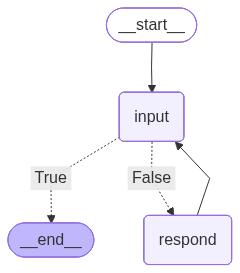
cot_chatbot.run("German")
# What is the distance between the Earth and the Moon divided by the number of the planets in the Solar system
================================ Human Message =================================
The user is asking a question. Please answer it using step-by-step reasoning. On each reasoning step, assess whether this reasoning step is good or not, on a scale from 1 to 10.
The user question is:
============
What is the distance between the Earth and the Moon divided by the number of the planets in the Solar system
================================== Ai Message ==================================
Schritt 1: Bestimmen des Abstands zwischen der Erde und dem Mond.
Der Abstand zwischen der Erde und dem Mond beträgt im Durchschnitt etwa 384.400 Kilometer. Diese Information ist allgemein bekannt und kann als zuverlässig betrachtet werden. Bewertung: 9/10 (gut, aber es könnte kleine Abweichungen geben, da der Mond nicht immer den gleichen Abstand zur Erde hat).
Schritt 2: Bestimmen der Anzahl der Planeten in unserem Sonnensystem.
Unser Sonnensystem besteht aus acht Planeten: Merkur, Venus, Erde, Mars, Jupiter, Saturn, Uranus und Neptun. Diese Information ist wissenschaftlich etabliert und kann als sehr zuverlässig betrachtet werden. Bewertung: 10/10 (sehr gut, da die Anzahl der Planeten in unserem Sonnensystem allgemein anerkannt ist).
Schritt 3: Berechnen des Ergebnisses durch Division des Abstands zwischen der Erde und dem Mond durch die Anzahl der Planeten.
Um das Ergebnis zu erhalten, teilen wir den Abstand zwischen der Erde und dem Mond (384.400 Kilometer) durch die Anzahl der Planeten (8). Ergebnis = 384.400 km / 8 = 48.050 km. Bewertung: 9/10 (gut, da die mathematische Operation korrekt durchgeführt wurde, aber die Genauigkeit des Ergebnisses hängt von der Genauigkeit der verwendeten Werte ab).
Zusammenfassung: Der Abstand zwischen der Erde und dem Mond geteilt durch die Anzahl der Planeten in unserem Sonnensystem beträgt etwa 48.050 Kilometer. Die Bewertung der Gesamtbewertung dieser Schritte liegt bei durchschnittlich 9,3/10, was auf eine solide und zuverlässige Argumentationskette hinweist.
================================ Human Message =================================
quit
3. Basic RAG 💉
Now let’s apply our new prompting tool to the basic RAG workflow. For that, we will just retrieve k most relevant documents and them insert them into the prompt as a part of the context.
We will combine the skills we have obtained so far to build a LangGraph agent that receives an input, checks if the user wants to quit, then do the retrieval and generate a context-aware response if not. We will build on the basic version of our first chatbot; to add the RAG functionality, we need to add a retrieval node and modify the generation prompt to inject the retrieved documents.
LangGraph provides a pre-built tool to conveniently create a retriever tool. The retriever tool can be connected to the LLM; in this case, the LLM decides itself whether to use it or not. But for our RAG labs, we separate the tool from the LLM to concentrate on the retrieval and not the agentic aspect of the system (which will be covered in the next week’s lab). We also won’t generate queries for the retriever for now.
from langchain.tools.retriever import create_retriever_tool# role: restrict it from the parametric knowledge
rag_system_prompt = """\
You are an assistant that has access to a knowledge base. \
You should use the knowledge base to answer the user's questions \
unless you can reliably answer them from your own knowledge.
"""
# this will add the context to the input
context_injection_prompt = """\
The user is asking a question. \
Answer using the following knowledge from the knowledge base:
==========================
{context}
==========================
The user question is:
{input}
"""
# finally, gather the system message, the previous messages,
# and the input with the context
rag_prompt = ChatPromptTemplate.from_messages(
[
("system", rag_system_prompt), # system message
MessagesPlaceholder(variable_name="messages"), # previous messages
("user", context_injection_prompt) # user message
]
)class BasicRAGChatbot(Chatbot):
_graph_path = "./graph_basic_rag.png"
def __init__(self, llm, k=5):
super().__init__(llm)
self.rag_prompt = rag_prompt
self.retriever = vector_store.as_retriever(search_kwargs={"k": k}) # retrieve 5 documents
self.retriever_tool = create_retriever_tool( # and this is the tool
self.retriever,
"retrieve_internal_data", # name
"Search relevant information in internal documents.", # description
)
def _build(self):
# graph builder
self._graph_builder = StateGraph(SimpleState)
# add the nodes
self._graph_builder.add_node("input", self._input_node)
self._graph_builder.add_node("retrieve", self._retrieve_node)
self._graph_builder.add_node("respond", self._respond_node)
# define edges
self._graph_builder.add_edge(START, "input")
# basic rag: no planning, just always retrieve
self._graph_builder.add_conditional_edges("input", self._is_quitting_node, {False: "retrieve", True: END})
self._graph_builder.add_edge("retrieve", "respond")
self._graph_builder.add_edge("respond", "input")
# compile the graph
self._compile()
def _retrieve_node(self, state: SimpleState) -> dict:
# retrieve the context
user_query = state["messages"][-1].content # use the last message as the query
context = self.retriever_tool.invoke({"query": user_query})
# add the context to the messages
return {
"messages": AIMessage(content=context)
}
def _respond_node(self, state: SimpleState) -> dict:
# the workflow is designed so that the context is always the last message
# and the user query is the second to last message
context = state["messages"].pop(-1).content # don't want the context in the messages
user_query = state["messages"][-1].content
prompt = self.rag_prompt.invoke(
{
"messages": state["messages"], # this goes to the message placeholder
"context": context, # this goes to the user message
"input": user_query # this goes to the user message
}
)
response = self.llm.invoke(prompt)
# add the response to the messages
return {
"messages": response
}
def run(self):
input = {"messages": []}
for event in self.chatbot.stream(input, stream_mode="values"):
if event["messages"]:
event["messages"][-1].pretty_print()
print("\n")basic_rag_chatbot = BasicRAGChatbot(llm)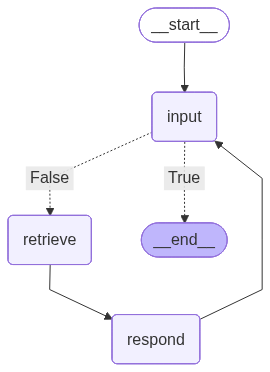
basic_rag_chatbot.run()
# What sessions do I have about virtual assistants?
# What is the reading for the third one?
# And second?
================================ Human Message =================================
What sessions do I have about virtual assistants?
================================== Ai Message ==================================
## LLM-based Assistants
Search
INFOS AND STUFF
Topics Overview
Debates
Pitches
LLM Inference Guide
BLOCK 1: INTRO
22.04. LLMs as a Form of Intelligence vs LLMs as Statistical Machines
24.04. LLM & Agent Basics
29.04. Intro to LangChain
BLOCK 2: CORE TOPICS | PART 1: BUSINESS APPLICATIONS
06.05. Virtual Assistants Pt. 1: Chatbots
08.05. Basic LLM-based Chatbot
BLOCK 2: CORE TOPICS | PART 2: APPLICATIONS IN SCIENCE
Under development
BLOCK 3: WRAP-UP
Under development
## Topics Overview
The schedule is preliminary and subject to changes !
- LangGraph Quickstart: Build a Basic Chatbot (part 2), LangGraph
- Agentic RAG, LangGraph
- Adaptive RAG, LangGraph
- Multimodality, LangChain
## Week 5
## 20.05. Lecture : Virtual Assistants Pt. 3: Multi-agent Environment
This lectures concludes the Virtual Assistants cycle and directs its attention to automating everyday / business operations in a multi-agent environment. We'll look at how agents communicate with each other, how their communication can be guided (both with and without involvement of a human), and this all is used in real applications.
## Key points :
- Multi-agent environment
- Human in the loop
- LLMs as evaluators
- Examples of pipelines for business operations
## Reading :
- Build a Chatbot, LangChain
- LangGraph Quickstart: Build a Basic Chatbot (parts 1, 3), LangGraph
- How to add summary of the conversation history, LangGraph
- Prompt Templates, LangChain
- Few-shot prompting, LangChain
## Week 4
## 13.05. Lecture : Virtual Assistants Pt. 2: RAG
Continuing the first part, the second part will expand scope of chatbot functionality and will teach it to refer to custom knowledge base to retrieve and use user-specific information. Finally, the most widely used deployment methods will be briefly introduced.
## Key points :
- General knowledge vs context
- Knowledge indexing, retrieval & ranking
- Retrieval tools
- Agentic RAG
- Messages, LangChain
- Chat models, LangChain
- Structured outputs, LangChain
- Tools, LangChain
- Tool calling, LangChain
## 01.05.
Ausfalltermin
## Block 2: Core Topics
## Part 1: Business Applications
## Week 3
06.05.
## Lecture : Virtual Assistants Pt. 1: Chatbots
The first core topic concerns chatbots. We'll discuss how chatbots are built, how they (should) handle harmful requests and you can tune it for your use case.
## Key points :
- LLMs alignment
- Memory
- Prompting & automated prompt generation
- Evaluation
## Core Reading :
- Aligning Large Language Models with Human: A Survey (pages 1-14), Huawei Noah's Ark Lab
Reading : see session 06.05, session 08.05, session 13.05, and session 15.05
19.06.
Ausfalltermin
## Week 10
## 24.06. Pitch : Handling Customer Requests in a Multi-agent Environment
On material of session 20.05
In the second pitch, the contractors will present their solution to automated handling of customer requests. The solution will have to introduce a multi-agent environment to take off working load from an imagined support team. The solution will have to read and categorize tickets, generate replies and (in case of need) notify the human that their interference is required. Specific requirements will be released on 27.05.
Reading : see session 20.05 and session 22.05
================================== Ai Message ==================================
You have the following sessions about virtual assistants:
1. 06.05: Virtual Assistants Pt. 1: Chatbots
2. 13.05: Virtual Assistants Pt. 2: RAG
3. 20.05: Virtual Assistants Pt. 3: Multi-agent Environment
These sessions cover topics such as building chatbots, expanding chatbot functionality, and automating everyday/business operations in a multi-agent environment.
================================ Human Message =================================
What is the reading for the third one?
================================== Ai Message ==================================
The reading for each lecture is given as references to the sources the respective lectures base on. You are not obliged to read anything. However, you are strongly encouraged to read references marked by pin emojis : those are comprehensive overviews on the topics or important works that are beneficial for a better understanding of the key concepts. For the pinned papers, I also specify the pages span for you to focus on the most important fragments. Some of the sources are also marked with a popcorn emoji : that is misc material you might want to take a look at: blog posts, GitHub repos, leaderboards etc. (also a couple of LLM-based games). For each of the sources, I also leave my subjective estimation of how important this work is for this specific topic: from yellow 'partially useful' though orange 'useful' to red ' crucial findings / thoughts ' . These estimations will be continuously updated as I revise the materials.
Reading : see session 06.05, session 08.05, session 13.05, and session 15.05
19.06.
Ausfalltermin
## Week 10
## 24.06. Pitch : Handling Customer Requests in a Multi-agent Environment
On material of session 20.05
In the second pitch, the contractors will present their solution to automated handling of customer requests. The solution will have to introduce a multi-agent environment to take off working load from an imagined support team. The solution will have to read and categorize tickets, generate replies and (in case of need) notify the human that their interference is required. Specific requirements will be released on 27.05.
Reading : see session 20.05 and session 22.05
- Text splitters, LangChain
- Embedding models, LangChain
- Vector stores, LangChain
- Retrievers, LangChain
- Retrieval augmented generation (RAG), LangChain
- LangGraph Quickstart: Build a Basic Chatbot (part 2), LangGraph
- Agentic RAG, LangGraph
- Adaptive RAG, LangGraph
- Multimodality, LangChain
## Week 5
## 20.05. Lecture : Virtual Assistants Pt. 3: Multi-agent Environment
For the labs , you are provided with practical tutorials that respective lab tasks will mostly derive from. The core tutorials are marked with a writing emoji ; you are asked to inspect them in advance (better yet: try them out). On lab sessions, we will only briefly recap them so it is up to you to prepare in advance to keep up with the lab.
Disclaimer : the reading entries are no proper citations; the bibtex references as well as detailed infos about the authors, publish date etc. can be found under the entry links.
## Block 1: Intro
Week 1
## 22.04. Lecture : LLMs as a Form of Intelligence vs LLMs as Statistical Machines
- LangGraph Quickstart: Build a Basic Chatbot (part 2), LangGraph
- Agentic RAG, LangGraph
- Adaptive RAG, LangGraph
- Multimodality, LangChain
## Week 5
## 20.05. Lecture : Virtual Assistants Pt. 3: Multi-agent Environment
This lectures concludes the Virtual Assistants cycle and directs its attention to automating everyday / business operations in a multi-agent environment. We'll look at how agents communicate with each other, how their communication can be guided (both with and without involvement of a human), and this all is used in real applications.
## Key points :
- Multi-agent environment
- Human in the loop
- LLMs as evaluators
- Examples of pipelines for business operations
================================== Ai Message ==================================
The "third one" refers to the session "20.05: Virtual Assistants Pt. 3: Multi-agent Environment". The reading for this session includes:
- Text splitters, LangChain
- Embedding models, LangChain
- Vector stores, LangChain
- Retrievers, LangChain
- Retrieval augmented generation (RAG), LangChain
- LangGraph Quickstart: Build a Basic Chatbot (part 2), LangGraph
- Agentic RAG, LangGraph
- Adaptive RAG, LangGraph
- Multimodality, LangChain
Note that the reading entries are not proper citations, and more detailed information about the authors, publication dates, etc. can be found under the entry links.
================================ Human Message =================================
And for the first one?
================================== Ai Message ==================================
- HTML: Creating the content, MDN
- Getting started with CSS, MDN
## Week 8: Having Some Rest
## 10.06.
Ausfalltermin
12.06.
Ausfalltermin
## Week 9
17.06.
## Pitch : RAG Chatbot
On material of session 06.05 and session 13.05
The first pitch will be dedicated to a custom RAG chatbot that the contractors (the presenting students, see the infos about Pitches) will have prepared to present. The RAG chatbot will have to be able to retrieve specific information from the given documents (not from the general knowledge ! ) and use it in its responses. Specific requirements will be released on 22.05.
Reading : see session 06.05, session 08.05, session 13.05, and session 15.05
19.06.
- Automatic Prompt Selection for Large Language Models, Cinnamon AI, Hung Yen University of Technology and Education & Deakin University
- PromptGen: Automatically Generate Prompts using Generative Models, Baidu Research
- Evaluating Large Language Models. A Comprehensive Survey, Tianjin University
## 08.05. Lab : Basic LLM-based Chatbot
On material of session 06.05
In this lab, we'll build a chatbot and try different prompts and settings to see how it affects the output.
## Reading :
- Build a Chatbot, LangChain
- LangGraph Quickstart: Build a Basic Chatbot (parts 1, 3), LangGraph
- How to add summary of the conversation history, LangGraph
- Prompt Templates, LangChain
- Berkeley Function-Calling Leaderboard, UC Berkeley (leaderboard)
- A Survey on Multimodal Large Language Models, University of Science and Technology of China & Tencent YouTu Lab
## Week 2
## 29.04. Lab : Intro to LangChain
The final introductory session will guide you through the most basic concepts of LangChain for the further practical sessions.
## Reading :
- Runnable interface, LangChain
- LangChain Expression Language (LCEL), LangChain
- Messages, LangChain
- Chat models, LangChain
- Structured outputs, LangChain
- Tools, LangChain
- Tool calling, LangChain
## 01.05.
Ausfalltermin
## Block 2: Core Topics
## Part 1: Business Applications
## Week 3
06.05.
## Reading :
- Build a Chatbot, LangChain
- LangGraph Quickstart: Build a Basic Chatbot (parts 1, 3), LangGraph
- How to add summary of the conversation history, LangGraph
- Prompt Templates, LangChain
- Few-shot prompting, LangChain
## Week 4
## 13.05. Lecture : Virtual Assistants Pt. 2: RAG
Continuing the first part, the second part will expand scope of chatbot functionality and will teach it to refer to custom knowledge base to retrieve and use user-specific information. Finally, the most widely used deployment methods will be briefly introduced.
## Key points :
- General knowledge vs context
- Knowledge indexing, retrieval & ranking
- Retrieval tools
- Agentic RAG
The reading for each lecture is given as references to the sources the respective lectures base on. You are not obliged to read anything. However, you are strongly encouraged to read references marked by pin emojis : those are comprehensive overviews on the topics or important works that are beneficial for a better understanding of the key concepts. For the pinned papers, I also specify the pages span for you to focus on the most important fragments. Some of the sources are also marked with a popcorn emoji : that is misc material you might want to take a look at: blog posts, GitHub repos, leaderboards etc. (also a couple of LLM-based games). For each of the sources, I also leave my subjective estimation of how important this work is for this specific topic: from yellow 'partially useful' though orange 'useful' to red ' crucial findings / thoughts ' . These estimations will be continuously updated as I revise the materials.
================================== Ai Message ==================================
The "first one" refers to the session "06.05: Virtual Assistants Pt. 1: Chatbots". The reading for this session includes:
- Build a Chatbot, LangChain
- LangGraph Quickstart: Build a Basic Chatbot (parts 1, 3), LangGraph
- How to add summary of the conversation history, LangGraph
- Prompt Templates, LangChain
- Few-shot prompting, LangChain
================================ Human Message =================================
quit
As you can see, it already works pretty well, but as the retrieval goes by the user query directly, the previous context of the conversation is not considered by the retriever. To handle that, let’s add a node that would reformulate the query taking in consideration the previous interactions.
For that, we need an additional prompt.
complete_query_prompt = ChatPromptTemplate.from_messages(
    [
        MessagesPlaceholder(variable_name="messages"),  # previous messages
        (
			"user",
			"Complete the following user query in the last message to a full question based on the previous messages. "
            "Return only the reformulated user query, without any other text. Do not expand the query "
			"or change its meaning and only fill in the missing information in the last question. "
			"\n\nUser query:\n{query}\n\nReformulated query:"
        )
    ]
)
class BasicPlusRAGChatbot(BasicRAGChatbot):
_graph_path = "./graph_basic_plus_rag.png"
def __init__(self, llm, k=5):
super().__init__(llm, k)
self.complete_query_prompt = complete_query_prompt
def _build(self):
# graph builder
self._graph_builder = StateGraph(SimpleState)
# add the nodes
self._graph_builder.add_node("input", self._input_node)
self._graph_builder.add_node("complete_query", self._complete_query_node)
self._graph_builder.add_node("retrieve", self._retrieve_node)
self._graph_builder.add_node("respond", self._respond_node)
# define edges
self._graph_builder.add_edge(START, "input")
# basic rag: no planning, just always retrieve
self._graph_builder.add_conditional_edges("input", self._is_quitting_node, {False: "complete_query", True: END})
self._graph_builder.add_edge("complete_query", "retrieve")
self._graph_builder.add_edge("retrieve", "respond")
self._graph_builder.add_edge("respond", "input")
# compile the graph
self._compile()
def _complete_query_node(self, state: SimpleState) -> dict:
# since we use the generated query instead of the user query,
# we want to remove the original user query from the messages
# and replace it with the generated one, having converted it to a HumanMessage
if len(state["messages"]) == 1:
return {} # no need to reformulate the first query
user_query = state["messages"].pop(-1)
prompt = self.complete_query_prompt.invoke({
**state, # will take the messages from here
"query": user_query.content # and the user query from here
})
generated_query = self.llm.invoke(prompt)
return {
"messages": [HumanMessage(content=generated_query.content)] # append the generated query to the messages
}basic_plus_rag_chatbot = BasicPlusRAGChatbot(llm, k=7)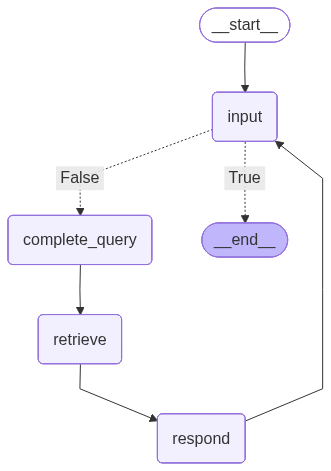
basic_plus_rag_chatbot.run()
# What sessions do I have about virtual assistants?
# What is the reading for the third one?
# And second?
================================ Human Message =================================
What sessions do I have about virtual assistants?
================================== Ai Message ==================================
## LLM-based Assistants
Search
INFOS AND STUFF
Topics Overview
Debates
Pitches
LLM Inference Guide
BLOCK 1: INTRO
22.04. LLMs as a Form of Intelligence vs LLMs as Statistical Machines
24.04. LLM & Agent Basics
29.04. Intro to LangChain
BLOCK 2: CORE TOPICS | PART 1: BUSINESS APPLICATIONS
06.05. Virtual Assistants Pt. 1: Chatbots
08.05. Basic LLM-based Chatbot
BLOCK 2: CORE TOPICS | PART 2: APPLICATIONS IN SCIENCE
Under development
BLOCK 3: WRAP-UP
Under development
## Topics Overview
The schedule is preliminary and subject to changes !
- LangGraph Quickstart: Build a Basic Chatbot (part 2), LangGraph
- Agentic RAG, LangGraph
- Adaptive RAG, LangGraph
- Multimodality, LangChain
## Week 5
## 20.05. Lecture : Virtual Assistants Pt. 3: Multi-agent Environment
This lectures concludes the Virtual Assistants cycle and directs its attention to automating everyday / business operations in a multi-agent environment. We'll look at how agents communicate with each other, how their communication can be guided (both with and without involvement of a human), and this all is used in real applications.
## Key points :
- Multi-agent environment
- Human in the loop
- LLMs as evaluators
- Examples of pipelines for business operations
## Reading :
- Build a Chatbot, LangChain
- LangGraph Quickstart: Build a Basic Chatbot (parts 1, 3), LangGraph
- How to add summary of the conversation history, LangGraph
- Prompt Templates, LangChain
- Few-shot prompting, LangChain
## Week 4
## 13.05. Lecture : Virtual Assistants Pt. 2: RAG
Continuing the first part, the second part will expand scope of chatbot functionality and will teach it to refer to custom knowledge base to retrieve and use user-specific information. Finally, the most widely used deployment methods will be briefly introduced.
## Key points :
- General knowledge vs context
- Knowledge indexing, retrieval & ranking
- Retrieval tools
- Agentic RAG
- Messages, LangChain
- Chat models, LangChain
- Structured outputs, LangChain
- Tools, LangChain
- Tool calling, LangChain
## 01.05.
Ausfalltermin
## Block 2: Core Topics
## Part 1: Business Applications
## Week 3
06.05.
## Lecture : Virtual Assistants Pt. 1: Chatbots
The first core topic concerns chatbots. We'll discuss how chatbots are built, how they (should) handle harmful requests and you can tune it for your use case.
## Key points :
- LLMs alignment
- Memory
- Prompting & automated prompt generation
- Evaluation
## Core Reading :
- Aligning Large Language Models with Human: A Survey (pages 1-14), Huawei Noah's Ark Lab
Reading : see session 06.05, session 08.05, session 13.05, and session 15.05
19.06.
Ausfalltermin
## Week 10
## 24.06. Pitch : Handling Customer Requests in a Multi-agent Environment
On material of session 20.05
In the second pitch, the contractors will present their solution to automated handling of customer requests. The solution will have to introduce a multi-agent environment to take off working load from an imagined support team. The solution will have to read and categorize tickets, generate replies and (in case of need) notify the human that their interference is required. Specific requirements will be released on 27.05.
Reading : see session 20.05 and session 22.05
- Text splitters, LangChain
- Embedding models, LangChain
- Vector stores, LangChain
- Retrievers, LangChain
- Retrieval augmented generation (RAG), LangChain
- LangGraph Quickstart: Build a Basic Chatbot (part 2), LangGraph
- Agentic RAG, LangGraph
- Adaptive RAG, LangGraph
- Multimodality, LangChain
## Week 5
## 20.05. Lecture : Virtual Assistants Pt. 3: Multi-agent Environment
- A Survey of Sustainability in Large Language Models: Applications, Economics, and Challenges, Cleveland State University et al.
## Week 14
## 22.07. Pitch : LLM-based Research Assistant
On material of session 01.07
The last pitch will introduce an agent that will have to plan the research, generate hypotheses, find the literature etc. for a given scientific problem. It will then have to introduce its results in form of a TODO or a guide for the researcher to start off of. Specific requirements will be released on 01.07.
Reading : see session 01.07 and session 03.07
## 24.07. Debate : Role of AI in Recent Years + Wrap-up
On material of session 17.07
================================== Ai Message ==================================
You have the following sessions about virtual assistants:
1. 06.05: Virtual Assistants Pt. 1: Chatbots - This session discusses how chatbots are built, how they handle harmful requests, and how to tune them for a specific use case.
2. 13.05: Virtual Assistants Pt. 2: RAG - This session expands the scope of chatbot functionality, teaching it to refer to a custom knowledge base to retrieve and use user-specific information.
3. 20.05: Virtual Assistants Pt. 3: Multi-agent Environment - This session concludes the Virtual Assistants cycle, focusing on automating everyday/business operations in a multi-agent environment.
These sessions cover various aspects of virtual assistants, from building chatbots to deploying them in multi-agent environments.
================================ Human Message =================================
What is the reading for the third one?
================================ Human Message =================================
What is the reading for the third Virtual Assistants session?
================================== Ai Message ==================================
- LangGraph Quickstart: Build a Basic Chatbot (part 2), LangGraph
- Agentic RAG, LangGraph
- Adaptive RAG, LangGraph
- Multimodality, LangChain
## Week 5
## 20.05. Lecture : Virtual Assistants Pt. 3: Multi-agent Environment
This lectures concludes the Virtual Assistants cycle and directs its attention to automating everyday / business operations in a multi-agent environment. We'll look at how agents communicate with each other, how their communication can be guided (both with and without involvement of a human), and this all is used in real applications.
## Key points :
- Multi-agent environment
- Human in the loop
- LLMs as evaluators
- Examples of pipelines for business operations
- Text splitters, LangChain
- Embedding models, LangChain
- Vector stores, LangChain
- Retrievers, LangChain
- Retrieval augmented generation (RAG), LangChain
- LangGraph Quickstart: Build a Basic Chatbot (part 2), LangGraph
- Agentic RAG, LangGraph
- Adaptive RAG, LangGraph
- Multimodality, LangChain
## Week 5
## 20.05. Lecture : Virtual Assistants Pt. 3: Multi-agent Environment
## LLM-based Assistants
Search
INFOS AND STUFF
Topics Overview
Debates
Pitches
LLM Inference Guide
BLOCK 1: INTRO
22.04. LLMs as a Form of Intelligence vs LLMs as Statistical Machines
24.04. LLM & Agent Basics
29.04. Intro to LangChain
BLOCK 2: CORE TOPICS | PART 1: BUSINESS APPLICATIONS
06.05. Virtual Assistants Pt. 1: Chatbots
08.05. Basic LLM-based Chatbot
BLOCK 2: CORE TOPICS | PART 2: APPLICATIONS IN SCIENCE
Under development
BLOCK 3: WRAP-UP
Under development
## Topics Overview
The schedule is preliminary and subject to changes !
Reading : see session 06.05, session 08.05, session 13.05, and session 15.05
19.06.
Ausfalltermin
## Week 10
## 24.06. Pitch : Handling Customer Requests in a Multi-agent Environment
On material of session 20.05
In the second pitch, the contractors will present their solution to automated handling of customer requests. The solution will have to introduce a multi-agent environment to take off working load from an imagined support team. The solution will have to read and categorize tickets, generate replies and (in case of need) notify the human that their interference is required. Specific requirements will be released on 27.05.
Reading : see session 20.05 and session 22.05
## Reading :
- Build a Chatbot, LangChain
- LangGraph Quickstart: Build a Basic Chatbot (parts 1, 3), LangGraph
- How to add summary of the conversation history, LangGraph
- Prompt Templates, LangChain
- Few-shot prompting, LangChain
## Week 4
## 13.05. Lecture : Virtual Assistants Pt. 2: RAG
Continuing the first part, the second part will expand scope of chatbot functionality and will teach it to refer to custom knowledge base to retrieve and use user-specific information. Finally, the most widely used deployment methods will be briefly introduced.
## Key points :
- General knowledge vs context
- Knowledge indexing, retrieval & ranking
- Retrieval tools
- Agentic RAG
- Messages, LangChain
- Chat models, LangChain
- Structured outputs, LangChain
- Tools, LangChain
- Tool calling, LangChain
## 01.05.
Ausfalltermin
## Block 2: Core Topics
## Part 1: Business Applications
## Week 3
06.05.
## Lecture : Virtual Assistants Pt. 1: Chatbots
The first core topic concerns chatbots. We'll discuss how chatbots are built, how they (should) handle harmful requests and you can tune it for your use case.
## Key points :
- LLMs alignment
- Memory
- Prompting & automated prompt generation
- Evaluation
## Core Reading :
- Aligning Large Language Models with Human: A Survey (pages 1-14), Huawei Noah's Ark Lab
## Block 3: Wrap-up
## Week 13
## 15.07. Pitch : Agent for Web Development
On material of session 03.06
The contractors will present their agent that will have to generate full (minimalistic) websites by a prompt. For each website, the agent will have to generate its own style and a simple menu with working navigation as well as the contents. Specific requirements will be released on 24.06.
Reading : see session 03.06 and session 05.06
## 17.07. Lecture : Role of AI in Recent Years
The last lecture of the course will turn to societal considerations regarding LLMs and AI in general and will investigate its role and influence on the humanity nowadays.
## Key points :
================================== Ai Message ==================================
The reading for the third Virtual Assistants session (20.05) is the same as the reading for sessions 06.05, 08.05, 13.05, and 15.05, and also includes:
- Build a Chatbot, LangChain
- LangGraph Quickstart: Build a Basic Chatbot (parts 1, 3), LangGraph
- How to add summary of the conversation history, LangGraph
- Prompt Templates, LangChain
- Few-shot prompting, LangChain
================================ Human Message =================================
And the second?
================================ Human Message =================================
What is the reading for the second Virtual Assistants session?
================================== Ai Message ==================================
Reading : see session 06.05, session 08.05, session 13.05, and session 15.05
19.06.
Ausfalltermin
## Week 10
## 24.06. Pitch : Handling Customer Requests in a Multi-agent Environment
On material of session 20.05
In the second pitch, the contractors will present their solution to automated handling of customer requests. The solution will have to introduce a multi-agent environment to take off working load from an imagined support team. The solution will have to read and categorize tickets, generate replies and (in case of need) notify the human that their interference is required. Specific requirements will be released on 27.05.
Reading : see session 20.05 and session 22.05
## LLM-based Assistants
Search
INFOS AND STUFF
Topics Overview
Debates
Pitches
LLM Inference Guide
BLOCK 1: INTRO
22.04. LLMs as a Form of Intelligence vs LLMs as Statistical Machines
24.04. LLM & Agent Basics
29.04. Intro to LangChain
BLOCK 2: CORE TOPICS | PART 1: BUSINESS APPLICATIONS
06.05. Virtual Assistants Pt. 1: Chatbots
08.05. Basic LLM-based Chatbot
BLOCK 2: CORE TOPICS | PART 2: APPLICATIONS IN SCIENCE
Under development
BLOCK 3: WRAP-UP
Under development
## Topics Overview
The schedule is preliminary and subject to changes !
- LangGraph Quickstart: Build a Basic Chatbot (part 2), LangGraph
- Agentic RAG, LangGraph
- Adaptive RAG, LangGraph
- Multimodality, LangChain
## Week 5
## 20.05. Lecture : Virtual Assistants Pt. 3: Multi-agent Environment
This lectures concludes the Virtual Assistants cycle and directs its attention to automating everyday / business operations in a multi-agent environment. We'll look at how agents communicate with each other, how their communication can be guided (both with and without involvement of a human), and this all is used in real applications.
## Key points :
- Multi-agent environment
- Human in the loop
- LLMs as evaluators
- Examples of pipelines for business operations
- Text splitters, LangChain
- Embedding models, LangChain
- Vector stores, LangChain
- Retrievers, LangChain
- Retrieval augmented generation (RAG), LangChain
- LangGraph Quickstart: Build a Basic Chatbot (part 2), LangGraph
- Agentic RAG, LangGraph
- Adaptive RAG, LangGraph
- Multimodality, LangChain
## Week 5
## 20.05. Lecture : Virtual Assistants Pt. 3: Multi-agent Environment
## Reading :
- Build a Chatbot, LangChain
- LangGraph Quickstart: Build a Basic Chatbot (parts 1, 3), LangGraph
- How to add summary of the conversation history, LangGraph
- Prompt Templates, LangChain
- Few-shot prompting, LangChain
## Week 4
## 13.05. Lecture : Virtual Assistants Pt. 2: RAG
Continuing the first part, the second part will expand scope of chatbot functionality and will teach it to refer to custom knowledge base to retrieve and use user-specific information. Finally, the most widely used deployment methods will be briefly introduced.
## Key points :
- General knowledge vs context
- Knowledge indexing, retrieval & ranking
- Retrieval tools
- Agentic RAG
- Messages, LangChain
- Chat models, LangChain
- Structured outputs, LangChain
- Tools, LangChain
- Tool calling, LangChain
## 01.05.
Ausfalltermin
## Block 2: Core Topics
## Part 1: Business Applications
## Week 3
06.05.
## Lecture : Virtual Assistants Pt. 1: Chatbots
The first core topic concerns chatbots. We'll discuss how chatbots are built, how they (should) handle harmful requests and you can tune it for your use case.
## Key points :
- LLMs alignment
- Memory
- Prompting & automated prompt generation
- Evaluation
## Core Reading :
- Aligning Large Language Models with Human: A Survey (pages 1-14), Huawei Noah's Ark Lab
## Block 3: Wrap-up
## Week 13
## 15.07. Pitch : Agent for Web Development
On material of session 03.06
The contractors will present their agent that will have to generate full (minimalistic) websites by a prompt. For each website, the agent will have to generate its own style and a simple menu with working navigation as well as the contents. Specific requirements will be released on 24.06.
Reading : see session 03.06 and session 05.06
## 17.07. Lecture : Role of AI in Recent Years
The last lecture of the course will turn to societal considerations regarding LLMs and AI in general and will investigate its role and influence on the humanity nowadays.
## Key points :
================================== Ai Message ==================================
The reading for the second Virtual Assistants session (13.05) is the same as the reading for sessions 06.05, 08.05, and 15.05.
================================ Human Message =================================
And how much this?
================================ Human Message =================================
And how much reading is there for the second Virtual Assistants session?
================================== Ai Message ==================================
- LangGraph Quickstart: Build a Basic Chatbot (part 2), LangGraph
- Agentic RAG, LangGraph
- Adaptive RAG, LangGraph
- Multimodality, LangChain
## Week 5
## 20.05. Lecture : Virtual Assistants Pt. 3: Multi-agent Environment
This lectures concludes the Virtual Assistants cycle and directs its attention to automating everyday / business operations in a multi-agent environment. We'll look at how agents communicate with each other, how their communication can be guided (both with and without involvement of a human), and this all is used in real applications.
## Key points :
- Multi-agent environment
- Human in the loop
- LLMs as evaluators
- Examples of pipelines for business operations
## LLM-based Assistants
Search
INFOS AND STUFF
Topics Overview
Debates
Pitches
LLM Inference Guide
BLOCK 1: INTRO
22.04. LLMs as a Form of Intelligence vs LLMs as Statistical Machines
24.04. LLM & Agent Basics
29.04. Intro to LangChain
BLOCK 2: CORE TOPICS | PART 1: BUSINESS APPLICATIONS
06.05. Virtual Assistants Pt. 1: Chatbots
08.05. Basic LLM-based Chatbot
BLOCK 2: CORE TOPICS | PART 2: APPLICATIONS IN SCIENCE
Under development
BLOCK 3: WRAP-UP
Under development
## Topics Overview
The schedule is preliminary and subject to changes !
- Text splitters, LangChain
- Embedding models, LangChain
- Vector stores, LangChain
- Retrievers, LangChain
- Retrieval augmented generation (RAG), LangChain
- LangGraph Quickstart: Build a Basic Chatbot (part 2), LangGraph
- Agentic RAG, LangGraph
- Adaptive RAG, LangGraph
- Multimodality, LangChain
## Week 5
## 20.05. Lecture : Virtual Assistants Pt. 3: Multi-agent Environment
## Reading :
- Build a Chatbot, LangChain
- LangGraph Quickstart: Build a Basic Chatbot (parts 1, 3), LangGraph
- How to add summary of the conversation history, LangGraph
- Prompt Templates, LangChain
- Few-shot prompting, LangChain
## Week 4
## 13.05. Lecture : Virtual Assistants Pt. 2: RAG
Continuing the first part, the second part will expand scope of chatbot functionality and will teach it to refer to custom knowledge base to retrieve and use user-specific information. Finally, the most widely used deployment methods will be briefly introduced.
## Key points :
- General knowledge vs context
- Knowledge indexing, retrieval & ranking
- Retrieval tools
- Agentic RAG
Reading : see session 06.05, session 08.05, session 13.05, and session 15.05
19.06.
Ausfalltermin
## Week 10
## 24.06. Pitch : Handling Customer Requests in a Multi-agent Environment
On material of session 20.05
In the second pitch, the contractors will present their solution to automated handling of customer requests. The solution will have to introduce a multi-agent environment to take off working load from an imagined support team. The solution will have to read and categorize tickets, generate replies and (in case of need) notify the human that their interference is required. Specific requirements will be released on 27.05.
Reading : see session 20.05 and session 22.05
- Messages, LangChain
- Chat models, LangChain
- Structured outputs, LangChain
- Tools, LangChain
- Tool calling, LangChain
## 01.05.
Ausfalltermin
## Block 2: Core Topics
## Part 1: Business Applications
## Week 3
06.05.
## Lecture : Virtual Assistants Pt. 1: Chatbots
The first core topic concerns chatbots. We'll discuss how chatbots are built, how they (should) handle harmful requests and you can tune it for your use case.
## Key points :
- LLMs alignment
- Memory
- Prompting & automated prompt generation
- Evaluation
## Core Reading :
- Aligning Large Language Models with Human: A Survey (pages 1-14), Huawei Noah's Ark Lab
- A Survey of Sustainability in Large Language Models: Applications, Economics, and Challenges, Cleveland State University et al.
## Week 14
## 22.07. Pitch : LLM-based Research Assistant
On material of session 01.07
The last pitch will introduce an agent that will have to plan the research, generate hypotheses, find the literature etc. for a given scientific problem. It will then have to introduce its results in form of a TODO or a guide for the researcher to start off of. Specific requirements will be released on 01.07.
Reading : see session 01.07 and session 03.07
## 24.07. Debate : Role of AI in Recent Years + Wrap-up
On material of session 17.07
================================== Ai Message ==================================
For the second Virtual Assistants session (13.05), the reading is the same as the reading for sessions 06.05, 08.05, and 15.05, but the specific amount of reading is not quantified in the provided knowledge base. However, the reading for session 06.05 is specified as:
- Aligning Large Language Models with Human: A Survey (pages 1-14), Huawei Noah's Ark Lab
- A Survey of Sustainability in Large Language Models: Applications, Economics, and Challenges, Cleveland State University et al.
And the reading for sessions 06.05, 08.05, 13.05, and 15.05 is also specified as:
- LangGraph Quickstart: Build a Basic Chatbot (part 2), LangGraph
- Agentic RAG, LangGraph
- Adaptive RAG, LangGraph
- Multimodality, LangChain
Additionally, the reading for session 20.05 is also applicable, which includes:
- Build a Chatbot, LangChain
- LangGraph Quickstart: Build a Basic Chatbot (parts 1, 3), LangGraph
- How to add summary of the conversation history, LangGraph
- Prompt Templates, LangChain
- Few-shot prompting, LangChain
So, the total reading for the second Virtual Assistants session includes at least 7-8 articles or chapters.
================================ Human Message =================================
quit
4. Advanced RAG 😎
Now we can move to a more complicated implementation. We will now make an iterative RAG chatbot: this chatbot will retrieve contexts iteratively and decide at each step whether the chunks retrieved so far are sufficient to answer the question; the answer is generated only when the retrieved contexts are enough (or when the limit on number of the contexts is reached).
Basically, we have almost everything we need to implement an iterative RAG pipeline. We only need to add three more nodes:
A node to (re)generate search queries for the index: now we won’t use the user query but specifically generate queries for the index.
A decision node, in which the LLM will decide whether the context retrieved so far is enough to proceed to the generation of the response.
As a useful addition, we will also add LLM-based filtering of the retrieved documents to filter out the documents that are semantically similar to the query but are not really relevant for answering the question.
We will start by transforming the state to accumulate the contexts gathered so far.
class AdvancedRAGState(SimpleState): # "messages" is already defined in SimpleRAGState
    queries: List[List[str]]            # this is the list of generated queries, one list per query generation
    docs: List[List[Document]]    # this is the list of retrieved documents, one list per retrieval
To (re)generate the queries, filter the retrieved documents, and decide whether the contexts are supportive enough, we add respective prompt templates.
generate_query_template = """\
The user is now asking a question. \
Your task is to think of a set of queries that will retrieve all necessary documents \
from the knowledge base to answer the user question. \
Return a comma-separated list of generated queries only (1-3 queries), without any other text.
Imagine you are trying to find a user some information in the internet \
on the topic they are interested in: don't just repeat the same query in different words \
but try to understand what information is required for answering the question and \
what queries would retrieve this information.

Below is a list of previously generated queries, if any. \
The previous queries retrieved documents turned out to be insufficient \
to answer the user's question. Avoid repeating the previous queries \
and explore different aspects of the question.

Previous queries:
{previous_queries}

The user question is:
{input}

Your generated queries:
"""

generate_query_prompt = ChatPromptTemplate.from_messages(
    [
		("system", rag_system_prompt),
        ("user", generate_query_template)
    ]
)
document_relevant_template = """\
The user is now asking a question. \
For answering the question, your colleague has retrieved the document below. \
Return the degree 1-5 to which the document is related to the user's question, \
where 1 means the document is about something absolutely different, and \
5 means the document is exactly about the topic brought up in the user's question.
===========================
Document:
{document}
===========================
The user question is:
{input}
Rating (1-5):
"""
document_relevant_prompt = ChatPromptTemplate.from_messages(
[
("system", rag_system_prompt),
("user", document_relevant_template)
]
)documents_sufficient_template = """\
The user is now asking a question. \
For answering the question, your colleague has retrieved the documents below. \
Return True if the documents are sufficient for answering the question, and False otherwise.
===========================
Documents:
{documents}
===========================
The user question is:
{input}
Verdict (True/False):
"""
documents_sufficient_prompt = ChatPromptTemplate.from_messages(
[
("system", rag_system_prompt),
("user", documents_sufficient_template)
]
)To reliably parse the generations, we need to add the following structure output schemes:
String list for the generated queries.
Rating 1-5 for document relevancy.
Boolean
True/Falsefor binary documents sufficiency.
from pydantic import BaseModel, Fieldclass ListOutput(BaseModel):
outputs: List[str] = Field(..., description="List of generated outputs.")class Rating1_5(BaseModel):
rating: int = Field(..., description="Rating from 1 to 5.")class YesNoVerdict(BaseModel):
verdict: bool = Field(..., description="Boolean answer to the given binary question.")For advanced RAG, we change the LLM and the settings to increase the overall stability.
# choose any model, catalogue is available under https://build.nvidia.com/models
MODEL_NAME_ADVANCED_RAG = "meta/llama-3.1-405b-instruct"

# this rate limiter will ensure we do not exceed the rate limit
# of 40 RPM given by NVIDIA
rate_limiter_advanced_rag = InMemoryRateLimiter(
    requests_per_second=1 / 6,  # 10 requests per minute to be sure
    check_every_n_seconds=5,  # wake up every 5 seconds to check whether allowed to make a request,
    max_bucket_size=1  # controls the maximum burst size
)

llm_advanced_rag = ChatNVIDIA(
    model=MODEL_NAME_ADVANCED_RAG,
    # api_key=os.getenv("NVIDIA_API_KEY"),
    temperature=0,   # ensure reproducibility,
    rate_limiter=rate_limiter_advanced_rag  # bind the rate limiter
)
class IterativeRAGChatbot(BasicPlusRAGChatbot):
_graph_path = "./graph_iterative_rag.png"
def __init__(self, llm, k=5, max_generations=3):
super().__init__(llm, k)
self.max_generations = max_generations
self.query_generator = generate_query_prompt | llm.with_structured_output(ListOutput)
self.document_relevant_grader = document_relevant_prompt | llm.with_structured_output(Rating1_5)
self.documents_sufficient_grader = documents_sufficient_prompt | llm.with_structured_output(YesNoVerdict)
def _build(self):
# graph builder
self._graph_builder = StateGraph(AdvancedRAGState)
# add the nodes
self._graph_builder.add_node("input", self._input_node)
self._graph_builder.add_node("complete_query", self._complete_query_node)
self._graph_builder.add_node("generate_query", self._generate_query_node)
self._graph_builder.add_node("retrieve", self._retrieve_node)
self._graph_builder.add_node("filter_documents", self._filter_documents_node)
self._graph_builder.add_node("respond", self._respond_node)
# define edges
self._graph_builder.add_edge(START, "input")
# basic rag: no planning, just always retrieve
self._graph_builder.add_conditional_edges("input", self._is_quitting_node, {False: "complete_query", True: END})
self._graph_builder.add_edge("complete_query", "generate_query")
self._graph_builder.add_edge("generate_query", "retrieve")
self._graph_builder.add_edge("retrieve", "filter_documents")
self._graph_builder.add_conditional_edges(
"filter_documents",
self._documents_sufficient_node,
{
False: "generate_query",
True: "respond",
None: END # max generations reached
}
)
self._graph_builder.add_edge("respond", "input")
# compile the graph
self._compile()
def _generate_query_node(self, state: AdvancedRAGState) -> dict:
complete_query = state["messages"][-1].content # complete user query
previous_queries = state["queries"][-1] if state["queries"] else []
generated_queries = self.query_generator.invoke(
{
# put previous queries
"previous_queries": "\n".join(previous_queries) or "NONE",
"input": complete_query
}
)
return {
# could have also used `Annotated` here
"queries": state["queries"] + [generated_queries.outputs] # List[str]
}
# now store the documents in the separate field
def _retrieve_node(self, state: AdvancedRAGState) -> dict:
# retrieve the documents
latest_queries = state["queries"][-1] # the last generated queries
# now use the retriever directly to get a list of documents and not a combined string
latest_documents = state["docs"][-1] if state["docs"] else []
newest_documents = []
for query in latest_queries:
documents = self.retriever.invoke(query)
newest_documents.extend([doc for doc in documents if doc not in newest_documents])
# add the document to the messages
newest_documents = [doc for doc in newest_documents if doc not in latest_documents]
return {
# could have also used `Annotated` here
"docs": state["docs"] + [newest_documents]
}
def _filter_documents_node(self, state: AdvancedRAGState) -> dict:
complete_query = state["messages"][-1].content # complete user query
# since the retrieved documents are graded at the same step,
# we only need to pass the last batch of documents
latest_documents = state["docs"].pop(-1) # will be replaced with the filtered ones
# grade each document separately and only keep the relevant ones
latest_documents_relevant = []
for document in latest_documents:
print("Grading document:\n\n", document.page_content)
rating = self.document_relevant_grader.invoke(
{
"document": document.page_content, # this is a Document object
"input": complete_query
}
)
print("\n\n")
print(f"Rating: {rating.rating}")
print("\n\n=====================\n\n")
if rating.rating >= 3: # boolean value according to the Pydantic model
latest_documents_relevant.append(document)
return {
# could have also used `Annotated` here
"docs": state["docs"] + [latest_documents_relevant]
}
def _flatten_documents(self, state: AdvancedRAGState) -> List[Document]:
all_documents = state["docs"]
return [document for sublist in all_documents for document in sublist]
def _documents_sufficient_node(self, state: AdvancedRAGState) -> dict:
complete_query = state["messages"][-1].content # complete user query
documents = self._flatten_documents(state)
if not documents:
return False
documents_str = "\n\n".join([document.page_content for document in documents])
print("Deciding whether the documents are sufficient")
verdict = self.documents_sufficient_grader.invoke(
{
"documents": documents_str, # this is a Document object
"input": complete_query
}
)
print("\n\n")
print(f"Verdict: {verdict.verdict}")
print("\n\n=====================\n\n")
if not verdict.verdict and len(documents) == self.max_generations:
return # will route to END
return verdict.verdict
def _respond_node(self, state: AdvancedRAGState) -> dict:
documents = self._flatten_documents(state)
documents_str = "\n\n".join([document.page_content for document in documents])
complete_query = state["messages"][-1].content
prompt = self.rag_prompt.invoke(
{
"messages": state["messages"], # this goes to the message placeholder
"context": documents_str, # this goes to the user message
"input": complete_query # this goes to the user message
}
)
response = self.llm.invoke(prompt)
# add the response to the messages
return {
"messages": response
}
def run(self):
input = {"messages": [], "docs": [], "queries": []}
for event in self.chatbot.stream(input, stream_mode="updates"):
for key, value in event.items():
if value and value.get("messages"):
# print(key, end="\n\n")
if not isinstance(value["messages"], list):
value["messages"] = [value["messages"]]
for message in value["messages"]:
message.pretty_print()
print("\n\n")
elif value and value.get("queries"):
print(f"\n\nGenerated queries: {', '.join(value['queries'][-1])}\n\n")# make very small k to ensure one retrieval is not enough
iterative_rag_chatbot = IterativeRAGChatbot(llm_advanced_rag, k=3)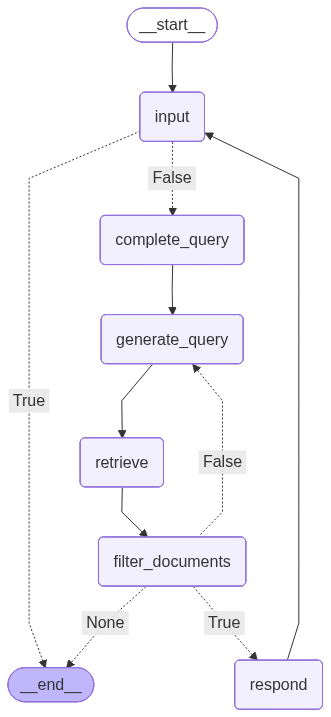
iterative_rag_chatbot.run()
# Summarize the topics of all the pitches in two sentences.
================================ Human Message =================================
Summarize the topics of all the pitches in two sentences.
Generated queries: list of pitches, pitch topics, pitch summaries
Grading document:
Reading : see session 06.05, session 08.05, session 13.05, and session 15.05
19.06.
Ausfalltermin
## Week 10
## 24.06. Pitch : Handling Customer Requests in a Multi-agent Environment
On material of session 20.05
In the second pitch, the contractors will present their solution to automated handling of customer requests. The solution will have to introduce a multi-agent environment to take off working load from an imagined support team. The solution will have to read and categorize tickets, generate replies and (in case of need) notify the human that their interference is required. Specific requirements will be released on 27.05.
Reading : see session 20.05 and session 22.05
Rating: 4
=====================
Grading document:
- HTML: Creating the content, MDN
- Getting started with CSS, MDN
## Week 8: Having Some Rest
## 10.06.
Ausfalltermin
12.06.
Ausfalltermin
## Week 9
17.06.
## Pitch : RAG Chatbot
On material of session 06.05 and session 13.05
The first pitch will be dedicated to a custom RAG chatbot that the contractors (the presenting students, see the infos about Pitches) will have prepared to present. The RAG chatbot will have to be able to retrieve specific information from the given documents (not from the general knowledge ! ) and use it in its responses. Specific requirements will be released on 22.05.
Reading : see session 06.05, session 08.05, session 13.05, and session 15.05
19.06.
Rating: 4
=====================
Grading document:
- A Survey of Sustainability in Large Language Models: Applications, Economics, and Challenges, Cleveland State University et al.
## Week 14
## 22.07. Pitch : LLM-based Research Assistant
On material of session 01.07
The last pitch will introduce an agent that will have to plan the research, generate hypotheses, find the literature etc. for a given scientific problem. It will then have to introduce its results in form of a TODO or a guide for the researcher to start off of. Specific requirements will be released on 01.07.
Reading : see session 01.07 and session 03.07
## 24.07. Debate : Role of AI in Recent Years + Wrap-up
On material of session 17.07
Rating: 2
=====================
Grading document:
## LLM-based Assistants
Search
INFOS AND STUFF
Topics Overview
Debates
Pitches
LLM Inference Guide
BLOCK 1: INTRO
22.04. LLMs as a Form of Intelligence vs LLMs as Statistical Machines
24.04. LLM & Agent Basics
29.04. Intro to LangChain
BLOCK 2: CORE TOPICS | PART 1: BUSINESS APPLICATIONS
06.05. Virtual Assistants Pt. 1: Chatbots
08.05. Basic LLM-based Chatbot
BLOCK 2: CORE TOPICS | PART 2: APPLICATIONS IN SCIENCE
Under development
BLOCK 3: WRAP-UP
Under development
## Topics Overview
The schedule is preliminary and subject to changes !
Rating: 4
=====================
Deciding whether the documents are sufficient
Verdict: True
=====================
================================== Ai Message ==================================
The pitches cover two main topics: the first pitch is about a custom RAG chatbot that can retrieve specific information from given documents and use it in its responses, while the second pitch is about automated handling of customer requests in a multi-agent environment. The solutions presented in the pitches aim to demonstrate the application of LLM-based assistants in real-world scenarios, such as customer support and information retrieval.
================================ Human Message =================================
quit