In today’l lab, we will create a multi-agent environment for automated meeting scheduling and preparation. We will see how the coordinator agent will communicate with two auxiliary agents to check time availability and prepare an agenda for the meeting.
Our plan for today:
Prerequisites
To start with the tutorial, complete the steps Prerequisites, Environment Setup, and Getting API Key from the LLM Inference Guide.
Today, we have more packages so we’ll use the requirements file to install the dependencies:
!curl -o requirements.txt https://raw.githubusercontent.com/maxschmaltz/Course-LLM-based-Assistants/main/llm-based-assistants/sessions/block2_core/2011/requirements.txt
!pip install -r requirements.txt
% Total % Received % Xferd Average Speed Time Time Time Current
Dload Upload Total Spent Left Speed
100 74 100 74 0 0 773 0 --:--:-- --:--:-- --:--:-- 778
Collecting langchain_nvidia_ai_endpoints (from -r requirements.txt (line 1))
Using cached langchain_nvidia_ai_endpoints-0.3.19-py3-none-any.whl.metadata (11 kB)
Collecting python-dotenv (from -r requirements.txt (line 2))
Using cached python_dotenv-1.2.1-py3-none-any.whl.metadata (25 kB)
Collecting langgraph (from -r requirements.txt (line 3))
Using cached langgraph-1.0.3-py3-none-any.whl.metadata (7.8 kB)
Collecting langgraph-supervisor (from -r requirements.txt (line 4))
Downloading langgraph_supervisor-0.0.31-py3-none-any.whl.metadata (14 kB)
Collecting aiohttp<4.0.0,>=3.9.1 (from langchain_nvidia_ai_endpoints->-r requirements.txt (line 1))
Using cached aiohttp-3.13.2-cp313-cp313-macosx_11_0_arm64.whl.metadata (8.1 kB)
Collecting filetype<2.0.0,>=1.2.0 (from langchain_nvidia_ai_endpoints->-r requirements.txt (line 1))
Using cached filetype-1.2.0-py2.py3-none-any.whl.metadata (6.5 kB)
Collecting langchain-core<0.4,>=0.3.51 (from langchain_nvidia_ai_endpoints->-r requirements.txt (line 1))
Downloading langchain_core-0.3.80-py3-none-any.whl.metadata (3.2 kB)
Collecting langgraph-checkpoint<4.0.0,>=2.1.0 (from langgraph->-r requirements.txt (line 3))
Using cached langgraph_checkpoint-3.0.1-py3-none-any.whl.metadata (4.7 kB)
Collecting langgraph-prebuilt<1.1.0,>=1.0.2 (from langgraph->-r requirements.txt (line 3))
Downloading langgraph_prebuilt-1.0.4-py3-none-any.whl.metadata (5.2 kB)
Collecting langgraph-sdk<0.3.0,>=0.2.2 (from langgraph->-r requirements.txt (line 3))
Using cached langgraph_sdk-0.2.9-py3-none-any.whl.metadata (1.5 kB)
Collecting pydantic>=2.7.4 (from langgraph->-r requirements.txt (line 3))
Using cached pydantic-2.12.4-py3-none-any.whl.metadata (89 kB)
Collecting xxhash>=3.5.0 (from langgraph->-r requirements.txt (line 3))
Using cached xxhash-3.6.0-cp313-cp313-macosx_11_0_arm64.whl.metadata (13 kB)
INFO: pip is looking at multiple versions of langgraph-supervisor to determine which version is compatible with other requirements. This could take a while.
Collecting langgraph-supervisor (from -r requirements.txt (line 4))
Downloading langgraph_supervisor-0.0.30-py3-none-any.whl.metadata (14 kB)
Downloading langgraph_supervisor-0.0.29-py3-none-any.whl.metadata (13 kB)
Collecting langgraph (from -r requirements.txt (line 3))
Downloading langgraph-0.6.11-py3-none-any.whl.metadata (6.8 kB)
Collecting langgraph-prebuilt<0.7.0,>=0.6.0 (from langgraph->-r requirements.txt (line 3))
Downloading langgraph_prebuilt-0.6.5-py3-none-any.whl.metadata (4.5 kB)
Collecting aiohappyeyeballs>=2.5.0 (from aiohttp<4.0.0,>=3.9.1->langchain_nvidia_ai_endpoints->-r requirements.txt (line 1))
Using cached aiohappyeyeballs-2.6.1-py3-none-any.whl.metadata (5.9 kB)
Collecting aiosignal>=1.4.0 (from aiohttp<4.0.0,>=3.9.1->langchain_nvidia_ai_endpoints->-r requirements.txt (line 1))
Using cached aiosignal-1.4.0-py3-none-any.whl.metadata (3.7 kB)
Collecting attrs>=17.3.0 (from aiohttp<4.0.0,>=3.9.1->langchain_nvidia_ai_endpoints->-r requirements.txt (line 1))
Using cached attrs-25.4.0-py3-none-any.whl.metadata (10 kB)
Collecting frozenlist>=1.1.1 (from aiohttp<4.0.0,>=3.9.1->langchain_nvidia_ai_endpoints->-r requirements.txt (line 1))
Using cached frozenlist-1.8.0-cp313-cp313-macosx_11_0_arm64.whl.metadata (20 kB)
Collecting multidict<7.0,>=4.5 (from aiohttp<4.0.0,>=3.9.1->langchain_nvidia_ai_endpoints->-r requirements.txt (line 1))
Using cached multidict-6.7.0-cp313-cp313-macosx_11_0_arm64.whl.metadata (5.3 kB)
Collecting propcache>=0.2.0 (from aiohttp<4.0.0,>=3.9.1->langchain_nvidia_ai_endpoints->-r requirements.txt (line 1))
Using cached propcache-0.4.1-cp313-cp313-macosx_11_0_arm64.whl.metadata (13 kB)
Collecting yarl<2.0,>=1.17.0 (from aiohttp<4.0.0,>=3.9.1->langchain_nvidia_ai_endpoints->-r requirements.txt (line 1))
Using cached yarl-1.22.0-cp313-cp313-macosx_11_0_arm64.whl.metadata (75 kB)
Collecting langsmith<1.0.0,>=0.3.45 (from langchain-core<0.4,>=0.3.51->langchain_nvidia_ai_endpoints->-r requirements.txt (line 1))
Downloading langsmith-0.4.44-py3-none-any.whl.metadata (14 kB)
Collecting tenacity!=8.4.0,<10.0.0,>=8.1.0 (from langchain-core<0.4,>=0.3.51->langchain_nvidia_ai_endpoints->-r requirements.txt (line 1))
Using cached tenacity-9.1.2-py3-none-any.whl.metadata (1.2 kB)
Collecting jsonpatch<2.0.0,>=1.33.0 (from langchain-core<0.4,>=0.3.51->langchain_nvidia_ai_endpoints->-r requirements.txt (line 1))
Using cached jsonpatch-1.33-py2.py3-none-any.whl.metadata (3.0 kB)
Collecting PyYAML<7.0.0,>=5.3.0 (from langchain-core<0.4,>=0.3.51->langchain_nvidia_ai_endpoints->-r requirements.txt (line 1))
Using cached pyyaml-6.0.3-cp313-cp313-macosx_11_0_arm64.whl.metadata (2.4 kB)
Collecting typing-extensions<5.0.0,>=4.7.0 (from langchain-core<0.4,>=0.3.51->langchain_nvidia_ai_endpoints->-r requirements.txt (line 1))
Using cached typing_extensions-4.15.0-py3-none-any.whl.metadata (3.3 kB)
Requirement already satisfied: packaging<26.0.0,>=23.2.0 in ./.venv/lib/python3.13/site-packages (from langchain-core<0.4,>=0.3.51->langchain_nvidia_ai_endpoints->-r requirements.txt (line 1)) (25.0)
Collecting ormsgpack>=1.12.0 (from langgraph-checkpoint<4.0.0,>=2.1.0->langgraph->-r requirements.txt (line 3))
Using cached ormsgpack-1.12.0-cp313-cp313-macosx_10_12_x86_64.macosx_11_0_arm64.macosx_10_12_universal2.whl.metadata (1.2 kB)
Collecting httpx>=0.25.2 (from langgraph-sdk<0.3.0,>=0.2.2->langgraph->-r requirements.txt (line 3))
Using cached httpx-0.28.1-py3-none-any.whl.metadata (7.1 kB)
Collecting orjson>=3.10.1 (from langgraph-sdk<0.3.0,>=0.2.2->langgraph->-r requirements.txt (line 3))
Using cached orjson-3.11.4-cp313-cp313-macosx_15_0_arm64.whl.metadata (41 kB)
Collecting annotated-types>=0.6.0 (from pydantic>=2.7.4->langgraph->-r requirements.txt (line 3))
Using cached annotated_types-0.7.0-py3-none-any.whl.metadata (15 kB)
Collecting pydantic-core==2.41.5 (from pydantic>=2.7.4->langgraph->-r requirements.txt (line 3))
Using cached pydantic_core-2.41.5-cp313-cp313-macosx_11_0_arm64.whl.metadata (7.3 kB)
Collecting typing-inspection>=0.4.2 (from pydantic>=2.7.4->langgraph->-r requirements.txt (line 3))
Using cached typing_inspection-0.4.2-py3-none-any.whl.metadata (2.6 kB)
Collecting anyio (from httpx>=0.25.2->langgraph-sdk<0.3.0,>=0.2.2->langgraph->-r requirements.txt (line 3))
Using cached anyio-4.11.0-py3-none-any.whl.metadata (4.1 kB)
Collecting certifi (from httpx>=0.25.2->langgraph-sdk<0.3.0,>=0.2.2->langgraph->-r requirements.txt (line 3))
Using cached certifi-2025.11.12-py3-none-any.whl.metadata (2.5 kB)
Collecting httpcore==1.* (from httpx>=0.25.2->langgraph-sdk<0.3.0,>=0.2.2->langgraph->-r requirements.txt (line 3))
Using cached httpcore-1.0.9-py3-none-any.whl.metadata (21 kB)
Collecting idna (from httpx>=0.25.2->langgraph-sdk<0.3.0,>=0.2.2->langgraph->-r requirements.txt (line 3))
Using cached idna-3.11-py3-none-any.whl.metadata (8.4 kB)
Collecting h11>=0.16 (from httpcore==1.*->httpx>=0.25.2->langgraph-sdk<0.3.0,>=0.2.2->langgraph->-r requirements.txt (line 3))
Using cached h11-0.16.0-py3-none-any.whl.metadata (8.3 kB)
Collecting jsonpointer>=1.9 (from jsonpatch<2.0.0,>=1.33.0->langchain-core<0.4,>=0.3.51->langchain_nvidia_ai_endpoints->-r requirements.txt (line 1))
Using cached jsonpointer-3.0.0-py2.py3-none-any.whl.metadata (2.3 kB)
Collecting requests-toolbelt>=1.0.0 (from langsmith<1.0.0,>=0.3.45->langchain-core<0.4,>=0.3.51->langchain_nvidia_ai_endpoints->-r requirements.txt (line 1))
Using cached requests_toolbelt-1.0.0-py2.py3-none-any.whl.metadata (14 kB)
Collecting requests>=2.0.0 (from langsmith<1.0.0,>=0.3.45->langchain-core<0.4,>=0.3.51->langchain_nvidia_ai_endpoints->-r requirements.txt (line 1))
Using cached requests-2.32.5-py3-none-any.whl.metadata (4.9 kB)
Collecting zstandard>=0.23.0 (from langsmith<1.0.0,>=0.3.45->langchain-core<0.4,>=0.3.51->langchain_nvidia_ai_endpoints->-r requirements.txt (line 1))
Using cached zstandard-0.25.0-cp313-cp313-macosx_11_0_arm64.whl.metadata (3.3 kB)
Collecting charset_normalizer<4,>=2 (from requests>=2.0.0->langsmith<1.0.0,>=0.3.45->langchain-core<0.4,>=0.3.51->langchain_nvidia_ai_endpoints->-r requirements.txt (line 1))
Using cached charset_normalizer-3.4.4-cp313-cp313-macosx_10_13_universal2.whl.metadata (37 kB)
Collecting urllib3<3,>=1.21.1 (from requests>=2.0.0->langsmith<1.0.0,>=0.3.45->langchain-core<0.4,>=0.3.51->langchain_nvidia_ai_endpoints->-r requirements.txt (line 1))
Using cached urllib3-2.5.0-py3-none-any.whl.metadata (6.5 kB)
Collecting sniffio>=1.1 (from anyio->httpx>=0.25.2->langgraph-sdk<0.3.0,>=0.2.2->langgraph->-r requirements.txt (line 3))
Using cached sniffio-1.3.1-py3-none-any.whl.metadata (3.9 kB)
Using cached langchain_nvidia_ai_endpoints-0.3.19-py3-none-any.whl (46 kB)
Using cached python_dotenv-1.2.1-py3-none-any.whl (21 kB)
Downloading langgraph_supervisor-0.0.29-py3-none-any.whl (16 kB)
Downloading langgraph-0.6.11-py3-none-any.whl (155 kB)
Using cached aiohttp-3.13.2-cp313-cp313-macosx_11_0_arm64.whl (489 kB)
Using cached filetype-1.2.0-py2.py3-none-any.whl (19 kB)
Downloading langchain_core-0.3.80-py3-none-any.whl (450 kB)
Using cached langgraph_checkpoint-3.0.1-py3-none-any.whl (46 kB)
Downloading langgraph_prebuilt-0.6.5-py3-none-any.whl (28 kB)
Using cached langgraph_sdk-0.2.9-py3-none-any.whl (56 kB)
Using cached pydantic-2.12.4-py3-none-any.whl (463 kB)
Using cached pydantic_core-2.41.5-cp313-cp313-macosx_11_0_arm64.whl (1.9 MB)
Using cached xxhash-3.6.0-cp313-cp313-macosx_11_0_arm64.whl (30 kB)
Using cached aiohappyeyeballs-2.6.1-py3-none-any.whl (15 kB)
Using cached aiosignal-1.4.0-py3-none-any.whl (7.5 kB)
Using cached annotated_types-0.7.0-py3-none-any.whl (13 kB)
Using cached attrs-25.4.0-py3-none-any.whl (67 kB)
Using cached frozenlist-1.8.0-cp313-cp313-macosx_11_0_arm64.whl (49 kB)
Using cached httpx-0.28.1-py3-none-any.whl (73 kB)
Using cached httpcore-1.0.9-py3-none-any.whl (78 kB)
Using cached jsonpatch-1.33-py2.py3-none-any.whl (12 kB)
Downloading langsmith-0.4.44-py3-none-any.whl (410 kB)
Using cached multidict-6.7.0-cp313-cp313-macosx_11_0_arm64.whl (43 kB)
Using cached orjson-3.11.4-cp313-cp313-macosx_15_0_arm64.whl (128 kB)
Using cached ormsgpack-1.12.0-cp313-cp313-macosx_10_12_x86_64.macosx_11_0_arm64.macosx_10_12_universal2.whl (369 kB)
Using cached propcache-0.4.1-cp313-cp313-macosx_11_0_arm64.whl (46 kB)
Using cached pyyaml-6.0.3-cp313-cp313-macosx_11_0_arm64.whl (173 kB)
Using cached tenacity-9.1.2-py3-none-any.whl (28 kB)
Using cached typing_extensions-4.15.0-py3-none-any.whl (44 kB)
Using cached typing_inspection-0.4.2-py3-none-any.whl (14 kB)
Using cached yarl-1.22.0-cp313-cp313-macosx_11_0_arm64.whl (93 kB)
Using cached idna-3.11-py3-none-any.whl (71 kB)
Using cached jsonpointer-3.0.0-py2.py3-none-any.whl (7.6 kB)
Using cached requests-2.32.5-py3-none-any.whl (64 kB)
Using cached certifi-2025.11.12-py3-none-any.whl (159 kB)
Using cached requests_toolbelt-1.0.0-py2.py3-none-any.whl (54 kB)
Using cached zstandard-0.25.0-cp313-cp313-macosx_11_0_arm64.whl (640 kB)
Using cached anyio-4.11.0-py3-none-any.whl (109 kB)
Using cached charset_normalizer-3.4.4-cp313-cp313-macosx_10_13_universal2.whl (208 kB)
Using cached h11-0.16.0-py3-none-any.whl (37 kB)
Using cached sniffio-1.3.1-py3-none-any.whl (10 kB)
Using cached urllib3-2.5.0-py3-none-any.whl (129 kB)
Installing collected packages: filetype, zstandard, xxhash, urllib3, typing-extensions, tenacity, sniffio, PyYAML, python-dotenv, propcache, ormsgpack, orjson, multidict, jsonpointer, idna, h11, frozenlist, charset_normalizer, certifi, attrs, annotated-types, aiohappyeyeballs, yarl, typing-inspection, requests, pydantic-core, jsonpatch, httpcore, anyio, aiosignal, requests-toolbelt, pydantic, httpx, aiohttp, langsmith, langgraph-sdk, langchain-core, langgraph-checkpoint, langchain_nvidia_ai_endpoints, langgraph-prebuilt, langgraph, langgraph-supervisor
Successfully installed PyYAML-6.0.3 aiohappyeyeballs-2.6.1 aiohttp-3.13.2 aiosignal-1.4.0 annotated-types-0.7.0 anyio-4.11.0 attrs-25.4.0 certifi-2025.11.12 charset_normalizer-3.4.4 filetype-1.2.0 frozenlist-1.8.0 h11-0.16.0 httpcore-1.0.9 httpx-0.28.1 idna-3.11 jsonpatch-1.33 jsonpointer-3.0.0 langchain-core-0.3.80 langchain_nvidia_ai_endpoints-0.3.19 langgraph-0.6.11 langgraph-checkpoint-3.0.1 langgraph-prebuilt-0.6.5 langgraph-sdk-0.2.9 langgraph-supervisor-0.0.29 langsmith-0.4.44 multidict-6.7.0 orjson-3.11.4 ormsgpack-1.12.0 propcache-0.4.1 pydantic-2.12.4 pydantic-core-2.41.5 python-dotenv-1.2.1 requests-2.32.5 requests-toolbelt-1.0.0 sniffio-1.3.1 tenacity-9.1.2 typing-extensions-4.15.0 typing-inspection-0.4.2 urllib3-2.5.0 xxhash-3.6.0 yarl-1.22.0 zstandard-0.25.0
[notice] A new release of pip is available: 25.0 -> 25.3
[notice] To update, run: pip install --upgrade pip
Then as always, we will initialize our LLM first. This time, we will be using llama
from langchain_nvidia_ai_endpoints import ChatNVIDIA
from langchain_core.rate_limiters import InMemoryRateLimiter
# read system variables
import os
import dotenv
dotenv.load_dotenv() # that loads the .env file variables into os.environTrue# choose any model, catalogue is available under https://build.nvidia.com/models
MODEL_NAME = "meta/llama-3.1-405b-instruct"
# this rate limiter will ensure we do not exceed the rate limit
# of 40 RPM given by NVIDIA
rate_limiter = InMemoryRateLimiter(
requests_per_second=1 / 6, # 10 requests per minute to be sure
check_every_n_seconds=5, # wake up every 5 seconds to check whether allowed to make a request,
max_bucket_size=1 # controls the maximum burst size
)
llm = ChatNVIDIA(
model=MODEL_NAME,
api_key=os.getenv("NVIDIA_API_KEY"),
temperature=0, # ensure reproducibility,
rate_limiter=rate_limiter # bind the rate limiter
)1. Creating an Agent 👾
Recap: a raw (textual) LLM can only generate text, is limited to what’s in its training data, and can only give you a single response. An agent overcomes this limitations by attaching tools, memory, and often access to external data sources to the LLM. This means agents can take actions, remember previous interactions, use APIs, and iteratively work through complex problems by deciding what to do next based on intermediate results.
LangGraph thinks about agents in a simple way: they are a construct out of three key components: the LLM itself, the tools, and the looping logic (Observe–Plan–Act workflow). This creates a cycle where the agent can:
Think about the problem
Decide which tool to use
Use the tool and see the result
Think about whether it’s done or needs to do more
Repeat until the task is complete
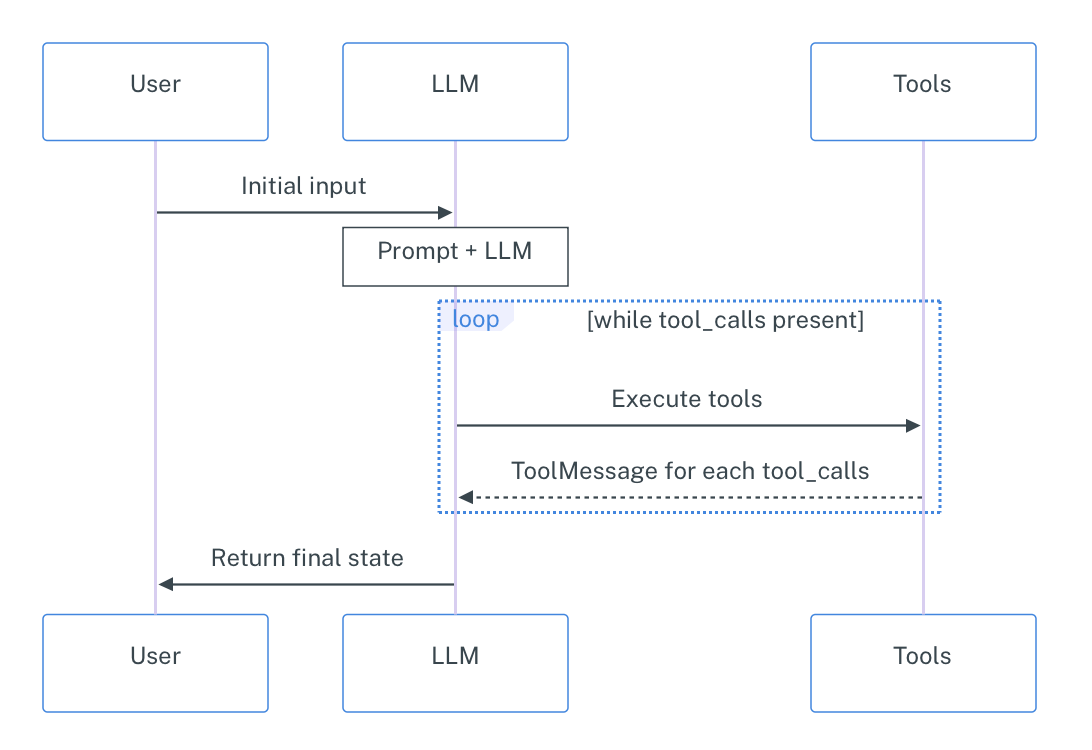
We will now create a very basic agent that can do simple math operations and calculate word length. This will help us understand the core concepts without getting too deep in complex functionality (yet).
We had initialized the LLM above, so now it’s time for the tools. Remember that LangChain reads out the docstring and the type annotations to determine when to use this tool so don’t forget to include those in your functions.
from langchain_core.tools import tool@tool
def add_numbers(a: float, b: float) -> float:
"""Add two numbers together."""
return a + b
@tool
def multiply_numbers(a: float, b: float) -> float:
"""Multiply two numbers together."""
return a * b
@tool
def get_word_length(word: str) -> int:
"""Get the length of a word."""
return len(word)
# put together
tools = [add_numbers, multiply_numbers, get_word_length]To initialize the agent quickly, we use the create_react_agent method from LangGraph; as mentioned before, it takes the LLM, the tools, and the couple of more parameters as the input and returns a fully functional graph with the Observe–Plan–Act workflow.
IMPORTANT: as of November 2025, the create_react_agent method is deprecated and moved to langchain.agents.create_agent. Conceptually these two are the same thing; there are a few technical differences but one can be converted into another easily. Since the principle framework for LLMs we use (langchain_nvidia_ai_endpoints) is not compatible with the latest LangGraph version, we stick to the older version. For more information about the new method see the Agents tutorial from LangChain and create_agent docu.
from langgraph.prebuilt import create_react_agent_basic_agent_prompt = """
Answer user questions using the provided tools. \
Always plan ahead first, then execute the plan step by step. \
If you face a complex task, break it down into smaller steps. \
You may use only one tool per action. \
Return only the results with no additional text.
"""
basic_agent = create_react_agent(
model=llm,
tools=tools,
prompt=_basic_agent_prompt
)from IPython.display import Image, displaydef draw_graph(agent, output_file_path: None):
graph_image = agent.get_graph().draw_mermaid_png(
output_file_path=output_file_path,
)
display(Image(graph_image))draw_graph(basic_agent, "basic_agent.png")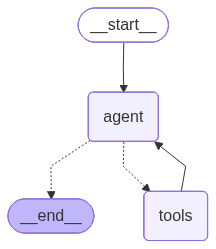
# wrapper for pretty print
def run_agent(agent, query, recursion_limit=50):
    input = {
        "messages": [("user", query)]
    }
    shown_messages = []
    for event in agent.stream(
        input,
        # set max recursion limit to avoid infinite loops
        config={"recursion_limit": recursion_limit},
        stream_mode="values"
    ):
        if event["messages"]:
            for message in event["messages"]:
                if not message.id in shown_messages:
                    shown_messages.append(message.id)
                    message.pretty_print()
                    print("\n")
run_agent(basic_agent, "I need to calculate (523 + 32) * 28 and get the length of the resulting number spelled out.")================================ Human Message =================================
I need to calculate (523 + 32) * 28 and get the length of the resulting number spelled out.
================================== Ai Message ==================================
Tool Calls:
add_numbers (chatcmpl-tool-257ae8b9fab746ef8f680bc474606941)
Call ID: chatcmpl-tool-257ae8b9fab746ef8f680bc474606941
Args:
a: 523
b: 32
================================= Tool Message =================================
Name: add_numbers
555.0
================================== Ai Message ==================================
Tool Calls:
multiply_numbers (chatcmpl-tool-e8b772bada374e30881b9c7921f72d70)
Call ID: chatcmpl-tool-e8b772bada374e30881b9c7921f72d70
Args:
a: 555
b: 28
================================= Tool Message =================================
Name: multiply_numbers
15540.0
================================== Ai Message ==================================
Tool Calls:
get_word_length (chatcmpl-tool-af9f055094cc4b78a6e34226d18a846d)
Call ID: chatcmpl-tool-af9f055094cc4b78a6e34226d18a846d
Args:
word: fifteenthousandfivehundredforty
================================= Tool Message =================================
Name: get_word_length
31
================================== Ai Message ==================================
The length of the word is 31.
Please note that this implementation will always try to call tools until the answer is reached, which may be inadequate for some applications.
run_agent(basic_agent, "What is the 5th largest country?")================================ Human Message =================================
What is the 5th largest country?
================================== Ai Message ==================================
I can't answer that question with the tools I have available.
As you can see, the default create_react_agent implementation is not optimal as it always tries to call a tool. To address this issue, we will insert a so-called pre_model_hook: a function that is called before the LLM. This function is a usual LangGraph node that is just incorporated in the default implementation.
In our case, we will make the LLM first plan the next action explicitly and then generate itself a command for the next action.
from langchain_core.tools import render_text_description
from langchain_core.prompts import ChatPromptTemplate, MessagesPlaceholderprint(render_text_description(tools))add_numbers(a: float, b: float) -> float - Add two numbers together.
multiply_numbers(a: float, b: float) -> float - Multiply two numbers together.
get_word_length(word: str) -> int - Get the length of a word.
tools_description = render_text_description(tools)

_plan_next_instruction = f"""
You are an agent who has access to the following tools:


{tools_description}


Your task is to define the best next action based on the previous messages \
and the tools available. You can either call one tool or \
return a text message to the user.

Return the next action you think is best to take as a textual description. \
Only return the single next action and not the whole plan.


Examples:

User: What is the weather now in Paris?
Assistant: Call the get_weather tool with argument "Paris".


User: When is the apocalypse happening?
Assistant: Generate the answer yourself and exit, no tool calls are needed here.
"""


_plan_next_prompt = ChatPromptTemplate.from_messages(
    [
        ("system", _plan_next_instruction),
        MessagesPlaceholder(variable_name="messages")
    ]
)
def plan_next(state):
next_action = (_plan_next_prompt | llm).invoke(state)
return {"messages": next_action}basic_plus_agent = create_react_agent(
model=llm,
tools=tools,
pre_model_hook=plan_next
)draw_graph(basic_plus_agent, "basic_plus_agent.png")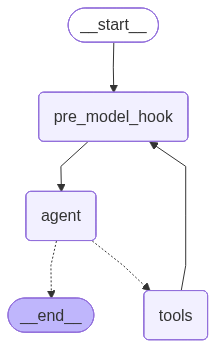
run_agent(basic_plus_agent, "I need to calculate (523 + 32) * 28 and get the length of the resulting number spelled out.")================================ Human Message =================================
I need to calculate (523 + 32) * 28 and get the length of the resulting number spelled out.
================================== Ai Message ==================================
Call the add_numbers tool with arguments 523 and 32.
================================== Ai Message ==================================
Tool Calls:
add_numbers (chatcmpl-tool-50fbb0fcd13544bbb53091bada6d3894)
Call ID: chatcmpl-tool-50fbb0fcd13544bbb53091bada6d3894
Args:
a: 523
b: 32
================================= Tool Message =================================
Name: add_numbers
555.0
================================== Ai Message ==================================
Call the multiply_numbers tool with arguments 555 and 28.
================================== Ai Message ==================================
Tool Calls:
multiply_numbers (chatcmpl-tool-63ed7d96b451416da04c7fa948a07e58)
Call ID: chatcmpl-tool-63ed7d96b451416da04c7fa948a07e58
Args:
a: 555
b: 28
================================= Tool Message =================================
Name: multiply_numbers
15540.0
================================== Ai Message ==================================
Call the get_word_length tool with the argument "fifteen thousand five hundred forty".
================================== Ai Message ==================================
Tool Calls:
get_word_length (chatcmpl-tool-b4fec44ea19a4832bf82710248e2a8c9)
Call ID: chatcmpl-tool-b4fec44ea19a4832bf82710248e2a8c9
Args:
word: fifteen thousand five hundred forty
================================= Tool Message =================================
Name: get_word_length
35
================================== Ai Message ==================================
The final answer is 35.
================================== Ai Message ==================================
The length of the number 15540 spelled out is 35.
run_agent(basic_plus_agent, "What is the 5th largest country?")================================ Human Message =================================
What is the 5th largest country?
================================== Ai Message ==================================
Generate the answer yourself and exit, no tool calls are needed here.
================================== Ai Message ==================================
The 5th largest country is Brazil.
2. Centralized Multi-agent System 👾🤖👾
In this section, we’ll create a multi-agent system for automated meeting scheduling and preparation. Our system will consist of three specialized agents:
Scheduler Agent - checks the availabilities of required participants and selects time slots that work for everyone
Creative Agent - reviews the project plan and generates a comprehensive agenda for the meeting
Coordinator Agent - orchestrates the other two agents, deciding when to call each one and combining their outputs
This will demonstrate how different agents can collaborate, each with their own expertise, to solve complex problems that would be difficult for a single agent to handle efficiently.
Executor Agents
For this tutorial, we’re focusing on understanding the multi-agent workflow and coordination patterns, so to avoid losing time for configuration of actual API integrations and external dependencies, we’ll implement dummy functions that simulate real-world services. We will respectively create a dummy calendar function that will output random hourly time slots, and a dummy RAG function that will simulate the process of retrieving relevant information about the project for agenda preparation.
import random@tool
def check_calendar_availability(name: str) -> list[str]:
"""
Retrieving availability of the worker from their calendar.
Returns a list of available time slots for a given person.
Args:
name: The person's name to check availability for
Returns:
List of available time slots as strings (e.g., ["14:00-15:00", "15:30-16:30"])
"""
# generate all possible hourly slots from 10:00-11:00 to 17:00-18:00 (increments by 30 minutes)
all_slots = []
start_hour = 10
end_hour = 17
for hour in range(start_hour, end_hour):
all_slots.append(f"{hour:02d}:00-{hour + 1:02d}:00")
all_slots.append(f"{hour:02d}:30-{hour + 1:02d}:30")
# randomly select 3-5 available slots for this person;
# since this is a dummy random function,
# we won't use the name since there's no real calendar to check,
# but the agent doesn't know that
num_available = random.randint(3, 5)
available_slots = random.sample(all_slots, num_available)
return sorted(available_slots)_project_state = """
Current Project: Mobile App Redesign (Q2 2024)
Status: In Progress (Week 6 of 12)
Recent Milestones:
- User research completed (Week 3)
- Wireframes approved by stakeholders (Week 5)
- Initial design mockups completed (Week 6)
Upcoming Milestones:
- Prototype development (Week 8-10)
- User testing sessions (Week 11)
- Final design handoff (Week 12)
Current Blockers:
- Waiting for brand guidelines update from marketing team
- Need approval on accessibility requirements
Budget Status: 70% utilized, on track
Timeline Status: Slightly behind schedule due to extended user research phase
"""
@tool
def retrieve_project_information(query: str) -> str:
"""
Query the internal documents to retrieve relevant project information.
Args:
query: The information being requested about the project
Returns:
Project information as a string
"""
return _project_state # make it staticNow let’s create our two executor agents, each with access to their respective tools:
We’ll bind the Scheduler Agent with the dummy calendar function
We’ll bind the Creative Agent with the dummy RAG function
For these two agents, we’ll use the create_react_agent again.
_scheduler_agent_prompt = """\
You are a scheduling assistant. Your job is to check participant availability \
and find time slots that work for everyone. You will be given the list of participants \
and your task is to find the shared available time slots for a meeting -- \
that is, time slots that are available for all participants. \
Only return the common slots as a list of strings \
(e.g., ["14:00-15:00", "15:30-16:30"]). \
If there are no common slots, say "No common slots available".
"""

scheduler_agent = create_react_agent(
    model=llm,
    tools=[check_calendar_availability],
    prompt=_scheduler_agent_prompt,
    name="scheduler_agent"  # add names for the coordinator
)
_creative_agent_prompt = """
You are a meeting preparation assistant. Your job is to create comprehensive meeting agendas \
based on current project status and goals. Always retrieve the latest project information first.
"""
creative_agent = create_react_agent(
model=llm,
tools=[retrieve_project_information],
prompt=_creative_agent_prompt,
name="creative_agent" # add names for the coordinator
)Coordinator Agent
A coordinator agent (also called a supervisor, or an orchestrator) is a special type of agent that doesn’t perform tasks directly. Instead, it decides which other agents should work on different parts of a complex request. The coordinator analyzes incoming requests, breaks them down into subtasks, assigns those subtasks to the appropriate agents, and then combines the results into a final response.
A separate package langgraph-supervisor allows us to create a coordinator agent from a template; the default implementation works the following way:
The coordinator gets the input from the user / the last executor
The coordinator decides which agent should step in next
The chosen executor gets the whole message history and generates the output
The output is returned to the coordinator, and the process loops
This implementation is not optimal because 1) there is no information segregation (all agents see the same messages); 2) the executors should decide themselves what exactly to do => no real coordination is going on. To address that, we’ll customize the coordinator with a so-called handoff function -- that is the function that defines what the output of the supervisor looks like. Namely, we’ll have our coordinator generate specific textual commands for the executors, and limit the informational scope of the executors to those commands. So now the workflow will look like this:
The coordinator gets the input from the user / the last executor
The coordinator decides which agent should step in next
The coordinator generates a specific task for the next agent
The chosen executor gets only this command and generates the output
The output is returned to the coordinator, and the process loops
from langgraph_supervisor.handoff import METADATA_KEY_HANDOFF_DESTINATION
from langchain_core.messages import AIMessage, HumanMessage, ToolMessage
from langgraph.types import Command, Send
from langgraph.prebuilt import InjectedState
from langchain_core.tools import InjectedToolCallId
from typing import Annotated
def create_task_description_handoff_tool(agent_name: str, description: str):
name = f"transfer_to_{agent_name}_with_task_description" # name of the tool
@tool(name, description=description)
def handoff_tool(
# this will be populated by the coordinator;
# the coordinator will see in the docstring that this
# tool needs a task description to be passed so it
# will generate one as the required parameter
task_description: str,
# the `InjectedState` annotation will ensure that the
# current state will be passed to the tool
# and this parameter will be ignored by the LLM
state: Annotated[dict, InjectedState],
# for ToolMessage, is not passed by the LLM either
tool_call_id: Annotated[str, InjectedToolCallId]
) -> Command:
"""
Delegate the task to another agent with a specific task description. The string \
task description is required to specify what the target agent should do.
Args:
task_description: A detailed description of the task to be performed by the target agent.
"""
# explicitly add a ToolMessage as a confirmation of the handoff
tool_message = ToolMessage(
content=f"Successfully transferred to {agent_name}",
tool_call_id=tool_call_id
)
# wrap the task description in an AI message (alternatively, you can use a user message)
task_description_message = AIMessage(content=task_description)
# this is a copy of the current state, but instead of the conversation history
# it will contain the tool message (for verbose), task description message
agent_input = {**state, "messages": [tool_message, task_description_message]}
# `Command` is an advanced graph navigation method;
# it allows to execute a required action in the graph
# immediately without the need to explicitly define
# rooting logic for it; for example, instead of defining
# a separate conditional node in the graph
# that would check to which agent to transfer the task,
# we can just use `Command` to send the task to the agent directly,
# which also helps to keep the state cleaner
return Command(
# that is the action to perform;
# `Send` is a special command that sends this specific input
# to the specified agent -- it's like calling
# `agent_name.invoke(agent_input)` but in the graph context;
# the reason to do that is that otherwise the agent would
# receive the shared state and not this specific "temporary" state
goto=[Send(agent_name, agent_input)],
# that says that the required agent is in the parent context
# (so in the main graph) and not in the local context
graph=Command.PARENT
)
# add metadata to specify the handoff destination
# for `langgraph_supervisor` to recognize
handoff_tool.metadata = {
METADATA_KEY_HANDOFF_DESTINATION: agent_name
}
return handoff_tool# init tools
assign_to_scheduler_agent_with_description = create_task_description_handoff_tool(
agent_name="scheduler_agent",
description="Assign task to the scheduler agent."
)
assign_to_creative_agent_with_description = create_task_description_handoff_tool(
agent_name="creative_agent",
description="Assign task to the creative agent."
)type(assign_to_scheduler_agent_with_description)langchain_core.tools.structured.StructuredToolassign_to_scheduler_agent_with_description.name'transfer_to_scheduler_agent_with_task_description'assign_to_scheduler_agent_with_description.metadata{'__handoff_destination': 'scheduler_agent'}Now we are ready to create our supervisor. The create_supervisor function will take care about all the routing, you should only give it the agents to manage and our custom handoff tools so that it generates the tasks explicitly.
from langgraph_supervisor import create_supervisor_lama_prompt = """
You are the head of a team of agents, and your task is to set up meetings \
and prepare agendas for them. You have two agents at your disposal:
- **Scheduler Agent**: Responsible for checking participant availability and finding common time slots. \
If it will return you several available slots, pick one yourself. If no common slots are available, exit.
- **Creative Agent**: Responsible for preparing meeting agendas based on the current project status.
Your task is to delegate tasks to these agents based on the user requests. \
When delegating the task, necessarily provide a detailed task description \
to the agent so it knows what to do. Do not stop until the task is completed.
Assign work to one agent at a step, do not call the agents in parallel. \
Do not do any work yourself.
Return the time slot and the agenda.
"""
coordinator = create_supervisor(
agents=[
scheduler_agent,
creative_agent
],
tools=[
assign_to_scheduler_agent_with_description,
assign_to_creative_agent_with_description
],
model=llm,
prompt=_lama_prompt,
supervisor_name="coordinator",
output_mode="full_history", # keep the full history of the conversation
add_handoff_messages=True, # add messages about task handoff to the conversation
add_handoff_back_messages=True, # add messages about task handoff back to the coordinator
parallel_tool_calls=False
)
lama = coordinator.compile()lama.builder.nodes["coordinator"].runnable.builder.nodes["tools"].runnable.tools_by_name{'transfer_to_scheduler_agent_with_task_description': StructuredTool(name='transfer_to_scheduler_agent_with_task_description', description='Assign task to the scheduler agent.', args_schema=<class 'langchain_core.utils.pydantic.transfer_to_scheduler_agent_with_task_description'>, metadata={'__handoff_destination': 'scheduler_agent'}, func=<function create_task_description_handoff_tool.<locals>.handoff_tool at 0x12054ba60>),
'transfer_to_creative_agent_with_task_description': StructuredTool(name='transfer_to_creative_agent_with_task_description', description='Assign task to the creative agent.', args_schema=<class 'langchain_core.utils.pydantic.transfer_to_creative_agent_with_task_description'>, metadata={'__handoff_destination': 'creative_agent'}, func=<function create_task_description_handoff_tool.<locals>.handoff_tool at 0x122bfc5e0>)}draw_graph(lama, "lama.png")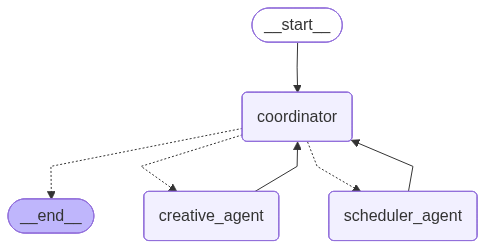
run_agent(lama, "Schedule a meeting with Jake, Mike, and Lucy to discuss the project status and prepare an agenda for it.", recursion_limit=100)================================ Human Message =================================
Schedule a meeting with Jake, Mike, and Lucy to discuss the project status and prepare an agenda for it.
================================= Tool Message =================================
Successfully transferred to scheduler_agent
================================== Ai Message ==================================
Schedule a meeting with Jake, Mike, and Lucy to discuss the project status
================================== Ai Message ==================================
Name: scheduler_agent
Tool Calls:
check_calendar_availability (chatcmpl-tool-53cdf7ce4249472db00415f2a204a20b)
Call ID: chatcmpl-tool-53cdf7ce4249472db00415f2a204a20b
Args:
name: Jake
================================= Tool Message =================================
Name: check_calendar_availability
["10:00-11:00", "10:30-11:30", "11:00-12:00", "13:30-14:30", "15:00-16:00"]
================================== Ai Message ==================================
Name: scheduler_agent
Tool Calls:
check_calendar_availability (chatcmpl-tool-76c7748fc0f94ede9516d16c32224b0a)
Call ID: chatcmpl-tool-76c7748fc0f94ede9516d16c32224b0a
Args:
name: Mike
================================= Tool Message =================================
Name: check_calendar_availability
["10:00-11:00", "13:30-14:30", "16:00-17:00"]
================================== Ai Message ==================================
Name: scheduler_agent
Tool Calls:
check_calendar_availability (chatcmpl-tool-050cac754bad4677b15bb783d9579b31)
Call ID: chatcmpl-tool-050cac754bad4677b15bb783d9579b31
Args:
name: Lucy
================================= Tool Message =================================
Name: check_calendar_availability
["10:00-11:00", "10:30-11:30", "13:00-14:00", "16:00-17:00"]
================================== Ai Message ==================================
Name: scheduler_agent
["10:00-11:00"]
================================== Ai Message ==================================
Name: scheduler_agent
Transferring back to coordinator
Tool Calls:
transfer_back_to_coordinator (36865498-53f1-4631-bf71-69de4679de86)
Call ID: 36865498-53f1-4631-bf71-69de4679de86
Args:
================================= Tool Message =================================
Name: transfer_back_to_coordinator
Successfully transferred back to coordinator
================================= Tool Message =================================
Successfully transferred to creative_agent
================================== Ai Message ==================================
Prepare an agenda for a meeting with Jake, Mike, and Lucy to discuss the project status
================================== Ai Message ==================================
Name: creative_agent
Tool Calls:
retrieve_project_information (chatcmpl-tool-329daaeb71dd4f8db1884a5a4d31a841)
Call ID: chatcmpl-tool-329daaeb71dd4f8db1884a5a4d31a841
Args:
query: project status for meeting with Jake, Mike, and Lucy
================================= Tool Message =================================
Name: retrieve_project_information
Current Project: Mobile App Redesign (Q2 2024)
Status: In Progress (Week 6 of 12)
Recent Milestones:
- User research completed (Week 3)
- Wireframes approved by stakeholders (Week 5)
- Initial design mockups completed (Week 6)
Upcoming Milestones:
- Prototype development (Week 8-10)
- User testing sessions (Week 11)
- Final design handoff (Week 12)
Current Blockers:
- Waiting for brand guidelines update from marketing team
- Need approval on accessibility requirements
Budget Status: 70% utilized, on track
Timeline Status: Slightly behind schedule due to extended user research phase
================================== Ai Message ==================================
Name: creative_agent
Agenda for Meeting with Jake, Mike, and Lucy:
I. Introduction and Project Overview (5 minutes)
* Review of the current project: Mobile App Redesign (Q2 2024)
* Objective: Discuss project status, address blockers, and align on next steps
II. Recent Milestones and Progress (15 minutes)
* Review of user research findings
* Discussion of wireframes and initial design mockups
* Review of recent milestones and progress
III. Upcoming Milestones and Timeline (15 minutes)
* Review of prototype development plans
* Discussion of user testing sessions and objectives
* Review of final design handoff timeline
IV. Current Blockers and Concerns (15 minutes)
* Discussion of brand guidelines update from marketing team
* Review of accessibility requirements and approval status
V. Budget and Timeline Status (10 minutes)
* Review of budget utilization (70% utilized, on track)
* Discussion of timeline status (slightly behind schedule)
VI. Next Steps and Action Items (10 minutes)
* Review of action items and responsibilities
* Establish deadlines for completion of tasks
VII. Conclusion and Adjournment (5 minutes)
* Recap of key takeaways and decisions
* Adjournment of meeting
================================== Ai Message ==================================
Name: creative_agent
Transferring back to coordinator
Tool Calls:
transfer_back_to_coordinator (ea90bc9e-65f3-43c6-a4ca-43ad099ba063)
Call ID: ea90bc9e-65f3-43c6-a4ca-43ad099ba063
Args:
================================= Tool Message =================================
Name: transfer_back_to_coordinator
Successfully transferred back to coordinator
================================== Ai Message ==================================
Name: coordinator
Time slot: 10:00-11:00
Agenda:
I. Introduction and Project Overview (5 minutes)
* Review of the current project: Mobile App Redesign (Q2 2024)
* Objective: Discuss project status, address blockers, and align on next steps
II. Recent Milestones and Progress (15 minutes)
* Review of user research findings
* Discussion of wireframes and initial design mockups
* Review of recent milestones and progress
III. Upcoming Milestones and Timeline (15 minutes)
* Review of prototype development plans
* Discussion of user testing sessions and objectives
* Review of final design handoff timeline
IV. Current Blockers and Concerns (15 minutes)
* Discussion of brand guidelines update from marketing team
* Review of accessibility requirements and approval status
V. Budget and Timeline Status (10 minutes)
* Review of budget utilization (70% utilized, on track)
* Discussion of timeline status (slightly behind schedule)
VI. Next Steps and Action Items (10 minutes)
* Review of action items and responsibilities
* Establish deadlines for completion of tasks
VII. Conclusion and Adjournment (5 minutes)
* Recap of key takeaways and decisions
* Adjournment of meeting
3. Human in The Loop 👾🤖🧐👾
Next thing we want to learn to do is adding human input within our pipeline. In multi-agent environments, involving a human can help handle ambiguous situations, resolve issues AI for some reason can’t, or just approve/reject AI suggestion. By combining the strengths of both humans and AI agents, we can achieve more reliable and robust solutions.
In our pipeline, when the time slot is found and an agenda is prepared, we will ask for a human approval before finalizing the task. For that, we will just need to insert a special node for receiving human input (more below).
Actually, under the hood the create_supervisor function creates yet another ReACT agent, but instead of usual tools, it has the agent executors (well technically, it has tools to call them):
# simplified but conceptually correct
coordinator = create_react_agent(
    model=llm,
    tools=[
        assign_to_scheduler_agent_with_description,
        assign_to_creative_agent_with_description
    ],
    prompt=_lama_prompt,    # reuse the prompt
    name="coordinator"
)
Now, you remember that we added a so-called pre_mode_hook to our basic agent (also a ReACT agent) to handle the absence of explicit planning. It added a custom node before the agent was invoked. Now we’ll do the opposite and add a post_model_hook to our coordinator which will be called after the agent generation. It will check if the coordinator decided to exit and will redirect the system to the human input node before exiting.
How will we know if the coordinator decided to exit? It’s actually really easy: a default ReACT agent can either call tools, or exit with a ready response. So if the latest message (that is the one from the coordinator) does not contain tool calls, it means that the coordinator has decided to exit and its response is contained in the usual .content property. It is this response that we will be redirecting to the human for approval.
Creating a human-in-the loop functionality is fairly easy with LangGraph: you just need to stop the workflow with a special interrupt() function and then return a familiar to us Command to continue it from the point we point to. In our case, we will redirect the workflow back to the coordinator for it to decide which changes should be made based on the human feedback
When the interrupt() function is executed, it actually stops the pipeline until the human input is given and it works such that the whole node where this function was called is re-executed; that is why it is highly recommended to have a separate node that handles human input in order to not regenerate anything that has already been done.
from langgraph.types import interrupt
from langgraph.checkpoint.memory import InMemorySaver
from langgraph.graph import END
def maybe_ask_human(state):
last_message = state["messages"][-1]
if last_message.tool_calls:
return {} # just resume the graph execution
ai_message = last_message.content
# when interrupting the graph, we can also show some text
# to the user; it the user prints "ok", it means that the user
# approves the suggestion; this is a fairly simple way to
# detect whether the user approves the suggestion or not,
# we adopt it here for simplicity; we might have as well
# used an LLM or a smaller LM-classifier
response = interrupt(f"Here's my suggestion:\n\n{ai_message}\n\nWaiting for approval. Print 'ok' if it works for you.")
if response.strip().lower() == "ok":
# stop if the suggestion works
return Command(
goto=END,
update={"messages": HumanMessage(content=response)} # this will update the state
)
# redirect back to the coordinator with the human response otherwise
return Command(
# here we don't use the `Send` because we want the whole state to be passed
goto="coordinator",
update={"messages": HumanMessage(content=response)}, # this will update the state
graph=Command.PARENT
)Since interrupt() stops the pipeline, LangGraph needs to remember where it left off to resume from there. To enable this, we use the InMemorySaver -- the same tool for checkpointing between the sessions we used in the lab about basic chatbots.
coordinator_h = create_supervisor(
    agents=[
        scheduler_agent,
        creative_agent
    ],
    tools=[
        assign_to_scheduler_agent_with_description,
        assign_to_creative_agent_with_description
    ],
    model=llm,
    prompt=_lama_prompt,
    supervisor_name="coordinator",
    output_mode="full_history",  # keep the full history of the conversation
    add_handoff_messages=True,  # add messages about task handoff to the conversation
    add_handoff_back_messages=True,  # add messages about task handoff back to the coordinator
    parallel_tool_calls=False,
    post_model_hook=maybe_ask_human  # ask the human for confirmation
)

lama_h = coordinator_h.compile(checkpointer=InMemorySaver())    # checkpointer here
When you are streaming graph execution and it gets interrupted, it returns a special event with an "__interrupt__" key that contains the content we passed to the interrupt() function.
To the best of my knowledge, the only way to detect an interruption automatically is to directly check for this key. In the wrapper function below, we check if there is an interrupt and prompt the user to answer the question if there is. The value under this key will contain a tuple with a single (in our case) Interrupt object with our text under the .value property.
After we received an answer from the human, we resume our workflow with a Command. It will throw us back to the node where the interrupt() function was called, and from there we will retrieve the answer and pass it back to the coordinator with yet another Command.
Here is the tricky part: since the interruption actually stops the pipeline, we should run it anew -- and that is why we need the checkpointer because it would have otherwise started from the very beginning. So to keep the pipeline even with the interruption running without our intervention, we wrap the launching into a loop; it will initially be run with the first request form the user, and then whenever an interruption is encountered, we will update the input to whatever the user has answered and the loop will rerun this pipeline with this new updated input.
# wrapper for pretty print
def run_agent_with_checkpoint(agent, query, recursion_limit=50):
    # initial input
    pipeline_input = {
        "messages": [("user", query)]
    }
    shown_messages = []
    while True: # this is needed to handle user interruptions
        for event in agent.stream(
            pipeline_input,
            config={
                "configurable": {
                    "thread_id": "1"
                },
                "recursion_limit": recursion_limit
            },
            stream_mode="values"
        ):
            if "__interrupt__" in event:
                question = event["__interrupt__"][0].value  # retrieve the question
                answer = input(question)    # get the answer from the user
                pipeline_input = Command(resume=answer) # update the input with the answer
                print("================================== Interruption ==================================")
                print(question)
            if "messages" in event:
                if isinstance(event["messages"][-1], HumanMessage) and event["messages"][-1].content == "ok":
                    return  # interrupt the execution if the user approves the suggestion
                for message in event["messages"]:
                    if not message.id in shown_messages:
                        shown_messages.append(message.id)
                        message.pretty_print()
                        print("\n")
run_agent_with_checkpoint(lama_h, "Schedule a meeting for Jake and Mike to discuss the project status and prepare an agenda for it.", recursion_limit=100)================================ Human Message =================================
Schedule a meeting for Jake and Mike to discuss the project status and prepare an agenda for it.
================================= Tool Message =================================
Successfully transferred to scheduler_agent
================================== Ai Message ==================================
Schedule a meeting for Jake and Mike to discuss the project status
================================== Ai Message ==================================
Name: scheduler_agent
Tool Calls:
check_calendar_availability (chatcmpl-tool-2756cd95d15742849e010aa9cffad4d0)
Call ID: chatcmpl-tool-2756cd95d15742849e010aa9cffad4d0
Args:
name: Jake
================================= Tool Message =================================
Name: check_calendar_availability
["11:00-12:00", "13:00-14:00", "14:00-15:00", "15:00-16:00", "15:30-16:30"]
================================== Ai Message ==================================
Name: scheduler_agent
Tool Calls:
check_calendar_availability (chatcmpl-tool-fb6165200ef14b428475a21c3a61890e)
Call ID: chatcmpl-tool-fb6165200ef14b428475a21c3a61890e
Args:
name: Mike
================================= Tool Message =================================
Name: check_calendar_availability
["10:00-11:00", "10:30-11:30", "11:00-12:00", "11:30-12:30", "16:00-17:00"]
================================== Ai Message ==================================
Name: scheduler_agent
["11:00-12:00"]
================================== Ai Message ==================================
Name: scheduler_agent
Transferring back to coordinator
Tool Calls:
transfer_back_to_coordinator (01c39640-7e55-4b2c-9e8c-e96c09e04170)
Call ID: 01c39640-7e55-4b2c-9e8c-e96c09e04170
Args:
================================= Tool Message =================================
Name: transfer_back_to_coordinator
Successfully transferred back to coordinator
================================= Tool Message =================================
Successfully transferred to creative_agent
================================== Ai Message ==================================
Prepare an agenda for a meeting between Jake and Mike to discuss the project status. The meeting is scheduled for 11:00-12:00.
================================== Ai Message ==================================
Name: creative_agent
Tool Calls:
retrieve_project_information (chatcmpl-tool-0bcf8500a505425eb96c8094c90d47d6)
Call ID: chatcmpl-tool-0bcf8500a505425eb96c8094c90d47d6
Args:
query: project status for meeting between Jake and Mike
================================= Tool Message =================================
Name: retrieve_project_information
Current Project: Mobile App Redesign (Q2 2024)
Status: In Progress (Week 6 of 12)
Recent Milestones:
- User research completed (Week 3)
- Wireframes approved by stakeholders (Week 5)
- Initial design mockups completed (Week 6)
Upcoming Milestones:
- Prototype development (Week 8-10)
- User testing sessions (Week 11)
- Final design handoff (Week 12)
Current Blockers:
- Waiting for brand guidelines update from marketing team
- Need approval on accessibility requirements
Budget Status: 70% utilized, on track
Timeline Status: Slightly behind schedule due to extended user research phase
================================== Ai Message ==================================
Name: creative_agent
Agenda for Meeting between Jake and Mike
I. Introduction and Objective (5 minutes, 11:00-11:05)
* Brief overview of the meeting's purpose
* Review of the current project status
II. Review of Recent Milestones (15 minutes, 11:05-11:20)
* Discussion of user research findings
* Review of approved wireframes
* Initial design mockups presentation
III. Upcoming Milestones and Tasks (20 minutes, 11:20-11:40)
* Review of prototype development timeline
* Planning for user testing sessions
* Final design handoff preparations
IV. Addressing Current Blockers (15 minutes, 11:40-11:55)
* Discussion on brand guidelines update from marketing team
* Review and approval of accessibility requirements
V. Conclusion and Next Steps (5 minutes, 11:55-12:00)
* Recap of action items and responsibilities
* Review of the project timeline and budget status
Note: The agenda is tailored to the specific needs and status of the Mobile App Redesign project, ensuring that all critical aspects are addressed during the meeting.
================================== Ai Message ==================================
Name: creative_agent
Transferring back to coordinator
Tool Calls:
transfer_back_to_coordinator (09545c80-0f11-415c-a80f-8aef3eb60070)
Call ID: 09545c80-0f11-415c-a80f-8aef3eb60070
Args:
================================= Tool Message =================================
Name: transfer_back_to_coordinator
Successfully transferred back to coordinator
================================== Interruption ==================================
Here's my suggestion:
11:00-12:00
Agenda for Meeting between Jake and Mike
I. Introduction and Objective (5 minutes, 11:00-11:05)
* Brief overview of the meeting's purpose
* Review of the current project status
II. Review of Recent Milestones (15 minutes, 11:05-11:20)
* Discussion of user research findings
* Review of approved wireframes
* Initial design mockups presentation
III. Upcoming Milestones and Tasks (20 minutes, 11:20-11:40)
* Review of prototype development timeline
* Planning for user testing sessions
* Final design handoff preparations
IV. Addressing Current Blockers (15 minutes, 11:40-11:55)
* Discussion on brand guidelines update from marketing team
* Review and approval of accessibility requirements
V. Conclusion and Next Steps (5 minutes, 11:55-12:00)
* Recap of action items and responsibilities
* Review of the project timeline and budget status
Note: The agenda is tailored to the specific needs and status of the Mobile App Redesign project, ensuring that all critical aspects are addressed during the meeting.
Waiting for approval. Print 'ok' if it works for you.
================================ Human Message =================================
no
================================== Interruption ==================================
Here's my suggestion:
The meeting is scheduled for 11:00-12:00. The agenda is as follows:
I. Introduction and Objective (5 minutes, 11:00-11:05)
* Brief overview of the meeting's purpose
* Review of the current project status
II. Review of Recent Milestones (15 minutes, 11:05-11:20)
* Discussion of user research findings
* Review of approved wireframes
* Initial design mockups presentation
III. Upcoming Milestones and Tasks (20 minutes, 11:20-11:40)
* Review of prototype development timeline
* Planning for user testing sessions
* Final design handoff preparations
IV. Addressing Current Blockers (15 minutes, 11:40-11:55)
* Discussion on brand guidelines update from marketing team
* Review and approval of accessibility requirements
V. Conclusion and Next Steps (5 minutes, 11:55-12:00)
* Recap of action items and responsibilities
* Review of the project timeline and budget status
Waiting for approval. Print 'ok' if it works for you.
================================ Human Message =================================
reschedule
================================= Tool Message =================================
Successfully transferred to scheduler_agent
================================== Ai Message ==================================
Reschedule a meeting for Jake and Mike to discuss the project status
================================== Ai Message ==================================
Name: scheduler_agent
Tool Calls:
check_calendar_availability (chatcmpl-tool-2350f12c21c744b6a4284ba2585eadff)
Call ID: chatcmpl-tool-2350f12c21c744b6a4284ba2585eadff
Args:
name: Jake
================================= Tool Message =================================
Name: check_calendar_availability
["10:30-11:30", "12:30-13:30", "14:30-15:30", "15:00-16:00", "15:30-16:30"]
================================== Ai Message ==================================
Name: scheduler_agent
Tool Calls:
check_calendar_availability (chatcmpl-tool-651fa057ba9649d0b532fbe528f9ff73)
Call ID: chatcmpl-tool-651fa057ba9649d0b532fbe528f9ff73
Args:
name: Mike
================================= Tool Message =================================
Name: check_calendar_availability
["10:30-11:30", "14:00-15:00", "15:00-16:00", "16:00-17:00"]
================================== Ai Message ==================================
Name: scheduler_agent
The common available time slots for Jake and Mike are: ["10:30-11:30", "15:00-16:00"]
================================== Ai Message ==================================
Name: scheduler_agent
Transferring back to coordinator
Tool Calls:
transfer_back_to_coordinator (6cf001ea-eeef-4fa8-8a12-b1ad5dc0ee48)
Call ID: 6cf001ea-eeef-4fa8-8a12-b1ad5dc0ee48
Args:
================================= Tool Message =================================
Name: transfer_back_to_coordinator
Successfully transferred back to coordinator
================================= Tool Message =================================
Successfully transferred to creative_agent
================================== Ai Message ==================================
Prepare an agenda for a meeting between Jake and Mike to discuss the project status. The meeting is scheduled for 10:30-11:30.
================================== Ai Message ==================================
Name: creative_agent
Tool Calls:
retrieve_project_information (chatcmpl-tool-cab1cb66fdb1425084205bb1fc23b6a8)
Call ID: chatcmpl-tool-cab1cb66fdb1425084205bb1fc23b6a8
Args:
query: project status for meeting between Jake and Mike
================================= Tool Message =================================
Name: retrieve_project_information
Current Project: Mobile App Redesign (Q2 2024)
Status: In Progress (Week 6 of 12)
Recent Milestones:
- User research completed (Week 3)
- Wireframes approved by stakeholders (Week 5)
- Initial design mockups completed (Week 6)
Upcoming Milestones:
- Prototype development (Week 8-10)
- User testing sessions (Week 11)
- Final design handoff (Week 12)
Current Blockers:
- Waiting for brand guidelines update from marketing team
- Need approval on accessibility requirements
Budget Status: 70% utilized, on track
Timeline Status: Slightly behind schedule due to extended user research phase
================================== Ai Message ==================================
Name: creative_agent
Based on the project status, I've prepared a meeting agenda for the discussion between Jake and Mike:
I. Introduction and Objective (5 minutes)
* Brief overview of the meeting's purpose
* Objective: Review project status, discuss current blockers, and align on next steps
II. Project Status Review (15 minutes)
* Review of recent milestones:
+ User research completion
+ Wireframes approval
+ Initial design mockups completion
* Review of upcoming milestones:
+ Prototype development
+ User testing sessions
+ Final design handoff
III. Current Blockers and Concerns (15 minutes)
* Discussion of current blockers:
+ Waiting for brand guidelines update from marketing team
+ Need approval on accessibility requirements
* Identification of potential risks and mitigation strategies
IV. Budget and Timeline Status (10 minutes)
* Review of budget utilization (70% utilized, on track)
* Review of timeline status (slightly behind schedule due to extended user research phase)
V. Next Steps and Action Items (10 minutes)
* Alignment on next steps for each team member
* Assignment of action items and responsibilities
VI. Conclusion and Adjournment (5 minutes)
* Recap of key takeaways and decisions
* Adjournment of the meeting
Meeting Time: 10:30-11:30
Attendees: Jake, Mike
Objective: Review project status, discuss current blockers, and align on next steps.
================================== Ai Message ==================================
Name: creative_agent
Transferring back to coordinator
Tool Calls:
transfer_back_to_coordinator (3f6c5a69-1aab-45ec-8c9d-9db24a141fb9)
Call ID: 3f6c5a69-1aab-45ec-8c9d-9db24a141fb9
Args:
================================= Tool Message =================================
Name: transfer_back_to_coordinator
Successfully transferred back to coordinator
================================== Interruption ==================================
Here's my suggestion:
Time slot: 10:30-11:30
Agenda:
I. Introduction and Objective (5 minutes)
* Brief overview of the meeting's purpose
* Objective: Review project status, discuss current blockers, and align on next steps
II. Project Status Review (15 minutes)
* Review of recent milestones:
+ User research completion
+ Wireframes approval
+ Initial design mockups completion
* Review of upcoming milestones:
+ Prototype development
+ User testing sessions
+ Final design handoff
III. Current Blockers and Concerns (15 minutes)
* Discussion of current blockers:
+ Waiting for brand guidelines update from marketing team
+ Need approval on accessibility requirements
* Identification of potential risks and mitigation strategies
IV. Budget and Timeline Status (10 minutes)
* Review of budget utilization (70% utilized, on track)
* Review of timeline status (slightly behind schedule due to extended user research phase)
V. Next Steps and Action Items (10 minutes)
* Alignment on next steps for each team member
* Assignment of action items and responsibilities
VI. Conclusion and Adjournment (5 minutes)
* Recap of key takeaways and decisions
* Adjournment of the meeting
Meeting Time: 10:30-11:30
Attendees: Jake, Mike
Objective: Review project status, discuss current blockers, and align on next steps.
Waiting for approval. Print 'ok' if it works for you.